Best Storylane alternative for technical teams
Compare the best Storylane alternative options for technical teams. See which tools are repo-owned, how updates work, and what it costs to keep demos fresh.

Open your last Storylane demo in one tab and your live product in another. Count the things that do not match. If you shipped anything in the last sprint, there is probably at least one screen that is already wrong. That is the real question behind the best Storylane alternative search: do you want another hosted demo you will keep patching by hand, or something you can own in your repo and update with an agent prompt?
On a previous project, I had a set of product walkthroughs I built for a Series A pitch. They looked clean. Then we shipped a pricing restructure and a nav rename in the same sprint. I opened the demos the morning of a follow-up investor call and realized three screens showed a product that no longer existed. Forty minutes of frantic re-recording, a re-upload, a broken embed, and I still went into the call with one screen showing the old modal because I ran out of time. The demos were not bad. They were just artifacts living in someone else's SaaS, cut off from the code I was shipping.
That hour is the real cost of a demo tool. It does not show up in comparison guides because those guides measure capture speed, the thing that wins trials, not the thing that matters after a few shipping cycles. The first demo is easy on every tool. The one a sprint later, after a nav rename and a pricing page restructure, is where the tool actually gets tested.
What an update actually costs on each kind of demo tool
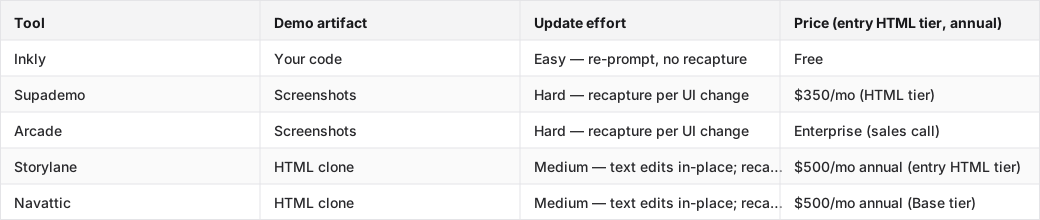
Screenshot-based tools (Supademo Starter/Scale, Arcade Free/Growth, Storylane Starter) capture your product as a series of images. A UI change means recapturing every affected screen. There is no in-place layout edit. HTML-clone tools (Storylane Growth, Navattic Base) crawl your live product and clone the DOM. Text and data edits happen in place; structural changes re-clone the affected flows. Code-owned tools produce the demo as code that lives in your repo. An update is a prompt to your coding agent. No recapture. No re-clone. No new recording.
The table below maps the five main options on the axis that decides this comparison: what an update costs after you ship.
Tools compared: Inkly, Supademo, Arcade, Storylane, Navattic.
Why the best Storylane alternative is the one that stays tied to your repo
The moment Storylane stops being enough
Storylane's Free tier caps at one published demo and screenshot/video only. The Starter tier ($40/seat/month annual) unlocks unlimited demos but stays on screenshots — no HTML. HTML capture, the HTML Demo Editor, and personalization tokens all sit behind Growth at $500/month annual (5 seats, trial-request required). That is the first crack: the features that make maintenance less painful are behind a $6,000/year commitment and a sales conversation. For a solo founder or a small team, Starter is the tier you can actually buy, and Starter leaves you in full-recapture mode on every UI change.
What repo ownership changes in practice
When the demo is a vendor asset, the update loop is: notice the mismatch, open the tool, recapture or re-edit, re-publish, re-embed. Every step happens inside someone else's UI. When the demo is code in your repo, the loop is: notice the mismatch, open your editor, prompt your agent, commit. The demo goes through the same review flow as the product code: PR, diff, merge. A designer or PM can review a demo update the same way they review a component change. That is not a workflow preference. It is a structural difference in how maintenance piles up.
Storylane limitations: where customization, scale, and security start to hurt
What Storylane Starter can and cannot do
Storylane Starter is $40/seat/month annual, which is affordable and self-serve. But the feature list tells you who it is built for: basic analytics, HubSpot and Zapier integration, custom branding. No HTML. No HTML Demo Editor. No A/B testing. No personalization tokens. The gap between Starter and Growth is not incremental. It is the difference between a screenshot tour and an actual product clone you can edit in place. If the maintenance-relevant capability is what you are buying, Starter is not the tier. Growth at $500/month annual is, and that is a different budget conversation entirely.
Why scale makes the maintenance bill obvious
Storylane Growth adds branching, multi-team sharing, custom lead forms, A/B testing, and a dedicated CSM. Those are real features for a GTM team running demos across a sales org. They also multiply the maintenance surface: every product change now has to propagate across branched variants, persona-specific versions, and A/B test arms. The more sophisticated the demo library, the more a single UI change costs to reconcile. G2's Storylane alternatives list reflects this in user reviews, with teams that outgrow Starter often finding that Growth's maintenance overhead grows faster than the team does.
Security review is not a footnote for technical teams
Engineering-led buyers will ask: where does the HTML clone live? Who has access to the captured product flows? What is the data-residency story? Storylane's SSO, whitelabel URLs, and Salesforce integration sit on Premium ($1,200/month annual, 10 seats) and above. Enterprise adds audit logs, custom permissions, and professional services. If your product handles sensitive data and your demo captures real product flows, the access-control answer on Growth is "dedicated CSM and integrations" — not the security controls a compliance review will look for. Gartner Peer Insights reviews for Storylane flag this as a friction point for teams that need SSO before they can deploy a demo platform internally.
Compare the best Storylane alternatives by ownership model and update workflow
Hosted capture tools still win the first minute
Supademo is the fastest path to a shareable demo if you are not operating a repo workflow. Chrome extension, capture, annotate, share. Under an hour for a clean first demo. The Scale tier ($38/creator/month annual) gets you unlimited demos, branching, and analytics. The tradeoff is simple: no HTML under the Growth tier ($350/month annual), so on Scale you are in full recapture mode for every UI change. Arcade is similar. Growth at ~$253/seat/month annual is polished and embed-friendly, but HTML capture moved to Enterprise as of May 2026. Both tools are strong for a first demo and weaker every sprint after.
Navattic and Storylane are the GTM-team lane
Navattic puts HTML on its free tier (one demo cap), which sounds like a win until you see the next tier: Base at $500/month annual for 5 seats. There is no middle ground. The feature list — embedded forms, A/B testing, personalization, dedicated CSM, MCP Server — is built for a sales-engineering org running demos across a pipeline, not a solo founder shipping weekly. Storylane Growth ($500/month annual) is the same story: the HTML capability is real, but the pricing, the trial-request gate, and the feature set all point at funded GTM teams. Both are legitimate tools for the right buyer. That buyer is not a builder with a $50/month budget and a weekly release cadence.
The repo-native option changes the comparison
The outlier in this comparison is a demo that lives as code next to the product. When the artifact is in your repo, an update is a prompt to your coding agent — Cursor, Claude, or Codex reads the current product state and re-authors the affected demo screens. No recapture pass. No re-clone. The demo and the product stay in sync through the same agent workflow you are already using to ship. Inkly is built on this premise: demos as code you own, created from a Chrome-extension capture or a direct agent prompt, living in your repo and updated without touching a hosted editor.
What each Storylane alternative costs to set up and keep current
When a cheap start becomes expensive upkeep
The entry price on Supademo Scale ($38/creator/month) and Storylane Starter ($40/seat/month) looks reasonable. The cost curve changes the first time you ship a UI change that touches five screens. On a screenshot tool, that is five recapture passes. Each one requires you to navigate the live product, trigger the right state, capture, annotate, and re-publish. On Storylane Starter, same thing. On Storylane Growth (HTML), structural changes still require re-cloning the affected flows; only text and data edits happen in place. The maintenance cost is not a one-time event. It is a recurring tax on every release.
Where a coding agent actually helps
If you are already using Cursor or Claude Code to ship the product, the repo-native demo workflow costs almost nothing to maintain. A nav rename in the product means a nav rename in the demo. One prompt, same agent, same PR. The demo diff is reviewable alongside the product diff. For a team shipping weekly, that is the difference between demos that stay current automatically and demos that fall behind by default. The bring-your-own-agent requirement is real. If you are not already operating a coding agent workflow, Supademo's all-in-platform flow is the cleaner starting point. But if you are, the maintenance math flips fast.
Pick the Storylane alternative that fits your role
Founders and indie hackers should optimize for ownership
A small team's scarcest resource is time spent on things that are not the product. A demo tool that requires a recapture pass every sprint is a recurring tax on founder hours. The right tool for a founder is the one with the lowest update cost per release, not the most polished editor or the most integrations. Repo ownership also means the demo travels with the codebase: new hire, new agent, new deployment — the demo is already there.
Product engineers should care about reviewability
Engineers already have a workflow for reviewing changes: branches, diffs, PRs. A demo that lives in the repo plugs into that workflow. A demo update becomes a reviewable commit. The PM can comment on it, the designer can approve it, the CI can catch a broken embed before it ships. That is a different maintenance model from opening a hosted editor and re-recording.
PMMs still need a tool they can actually ship with
If your team needs lead capture forms, CRM hooks, and per-account branching on a demo that a non-engineer can update, Storylane Growth or Navattic Base are the right tools, at the price those tiers cost. Supademo Growth ($350/month annual) is a cheaper path to branching and analytics without HTML. For a PMM who needs to ship a demo today and is not operating a repo, the hosted tools are still the right call. The tradeoff is the recurring maintenance cost every time the product ships.
How to migrate from Storylane without rebuilding everything
What survives the move
Copy and flow logic are the most portable assets. The narrative structure of a demo — what you show, in what order, what you say — does not change when you change tools. Screenshots can be used as reference for rebuilding screens. What usually has to be recreated: the captured product state (screenshots or HTML clone), any embedded personalization tokens, lead forms, and analytics integrations. If you have live Storylane demos in circulation with active tracking links, those links will break on migration, so plan for a redirect or a handoff period.
The order to rebuild in matters
Move the core demo path first: the primary flow a prospect or investor sees, with no branching. Get that working and shareable before touching anything else. Then rebuild the personalization layer: per-account variables, company name tokens, custom CTAs. Last, migrate the analytics integrations and any A/B test variants. Trying to migrate everything at once is where migrations stall. The Gartner alternatives list for Storylane shows that teams switching platforms most often cite "migration complexity" as the friction point. The sequenced approach above keeps the critical demo live while the rest catches up.
Where Inkly comes in
The structural problem this comparison keeps surfacing is that the demo and the product live in different places. The product is in your repo, shipping weekly. The demo is in a vendor's SaaS, falling behind weekly. Every hosted tool — Supademo, Arcade, Storylane, Navattic — solves the first-demo problem cleanly and then hands you a recurring maintenance cost shaped by that separation.
Inkly is built on the premise that the demo should be code you own, living next to the product, updated by the same agent that updates the product. The Chrome-extension capture path gives you the same quick first demo as Supademo. The difference shows up on the next sprint: instead of opening a hosted editor and recapturing screens, you prompt your coding agent and commit a diff. The honest limitation is that this requires a coding agent workflow (Cursor, Claude, Codex). If your team is not already there, the bring-your-own-agent path is extra setup. But if you are, demos as code you own changes the maintenance problem more than any hosted editor does.
FAQ
Q: Which Storylane alternative is best if I want repo ownership?
Inkly is the only option in this comparison where the demo artifact is code that lives in your repo. Every other tool — Supademo, Arcade, Storylane, Navattic — hosts the demo inside their platform. Repo ownership matters because it means updates go through your existing agent and review workflow instead of a separate hosted editor.
Q: Which platform lets my team update demos without re-recording?
HTML-clone tools (Storylane Growth, Navattic Base) let you edit text and data in place without re-recording, but structural UI changes still require re-cloning the affected flows. Code-owned demos (Inkly) avoid recapture entirely. A UI change is a prompt to your coding agent, not a new recording pass. Screenshot-based tools (Supademo Scale, Arcade Growth) require full recapture on any UI change.
Q: How much engineering involvement do these tools really need?
Supademo and Arcade are zero-engineering for setup and ongoing use. The Chrome extension and hosted editor handle everything. Storylane and Navattic are similar for non-HTML tiers; HTML tiers may need engineering to set up the capture environment. Inkly requires a coding agent (Cursor, Claude, Codex) and a repo workflow for the maintenance path. Setup is light if you are already there, meaningful if you are not.
Q: What is the easiest migration path from Storylane?
Migrate the core demo flow first, using your existing copy and flow logic as the structure. Screenshots from Storylane can serve as reference for rebuilding screens. Rebuild personalization and analytics last. Expect to recreate the captured product state from scratch. That is the one asset that does not transfer cleanly across tools.
Q: What trade-offs do I make between guided tours, sandbox demos, and cloned-app experiences?
Guided tours (screenshot-based) are the fastest to produce and the most expensive to maintain. Every UI change is a recapture. Cloned-app experiences (HTML clone) are more realistic and support in-place text edits, but structural changes still require re-cloning and the entry price is $500/month or higher on every tool that offers them. Sandbox demos (Storylane Enterprise, Navattic Growth) let prospects explore freely but require the most setup and live at enterprise tiers. Code-owned demos are the fourth option: realistic, fully editable via agent prompt, and portable, at the cost of requiring a repo workflow to maintain.
Conclusion
Go back to those two tabs — the Storylane demo and the live product. If keeping them aligned requires manual work every sprint, that is not a workflow problem; it is a tool-shape problem. The right Storylane alternative for a technical team is the one where a product change and a demo update are the same kind of work, handled by the same agent, in the same repo. Pick one alternative from this list, run a real update on a current demo this week, and measure what it actually costs. That test tells you more than any comparison guide does.
Ship your next demo before the meeting starts
Interactive demos built from your real product and kept current as you ship, done for you.


