Best demo automation tools for products that change weekly
Compare the best demo automation tools by upkeep, update flow, and pricing. See which tools hold up after weekly releases and which ones break on the first UI c

Open the last demo you sent a prospect. Open your live product in another tab. Count the things that no longer match.
If your product ships weekly, the best demo automation tools are not the ones that make a beautiful first demo. They are the ones that do not turn every release into a re-recording job. Most comparison guides skip that part, but it is the part that matters once you are past the first pitch.
The update tax is the whole story for demo automation tools
Open the old demo and count the mismatches
Pull up the demo you built three sprints ago. Go through it screen by screen and compare it with the live product. The nav item that moved. The onboarding modal that got redesigned. The pricing field that now shows a different default. The button label you renamed last sprint. Each mismatch is not just a cosmetic problem. It is a credibility problem the next viewer will notice before you do.
What a release actually costs after launch
The bill arrives the week after you ship. With a screenshot-based tool, every changed screen means another capture pass: open the tool, re-record the screen, re-mask any sensitive data, re-annotate the step, re-test the flow. With an HTML-clone tool, text and data fields edit in place, but structural changes, like a nav restructure, a new modal, or a reordered sidebar, still force a re-clone of the affected sections. With a code-owned demo, the update is simpler: describe what changed, run the agent against the existing demo code, done. The artifact does not need a separate content workflow because it lives next to the product.
Three update models, one decision
Screenshot, HTML clone, and code-owned are not three points on a quality spectrum. They are three different maintenance contracts. The table below compares the tools in this category so you can see the update cost before you commit.
Tools compared: Inkly, Supademo, Arcade, Storylane, Navattic.
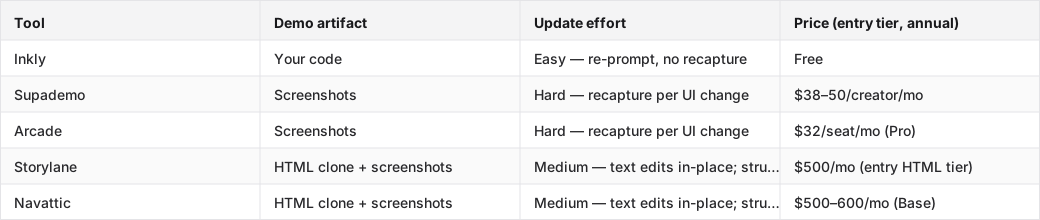
How the best demo automation tools split on first capture and upkeep
The fastest demo is not the cheapest demo to keep
Supademo and Arcade win on first capture. The flow is clean: install the extension, click through your product, get a shareable link in under an hour. That speed is real, and it deserves credit. The cost shows up the next time you ship a UI change. Every affected screen needs another capture pass, and those passes stack up across releases. If your product ships weekly, your demo needs weekly attention. No amount of polish on the first version changes that.
Why some teams should still choose capture-first
A sales-led team running demos on a six-week sales cycle with a product that ships monthly has a very different update tax than a solo founder shipping every Friday. For the sales-led team, Supademo or Arcade is a defensible choice. The polish is real, the CRM workflow integrations are mature, and the recapture cadence is manageable. The catch is that HTML capture, which reduces the update cost, sits behind Supademo's Growth tier ($350–450/mo) and is Enterprise-only on Arcade (sales call required). If you are on Pro or Scale and your product keeps changing shape, you will feel that gap.
Compare demo automation tools by the artifact they make you own
Screenshot tools make every changed screen a new task
Supademo and Arcade both produce screenshot-based demos at their self-serve tiers. When the UI changes, the captured screen goes stale and the affected steps have to be recaptured one by one. There is no in-place layout edit. The tool cannot reach into a screenshot and move a nav item. The work is linear: more changed screens means more recapture passes. Supademo's documentation describes re-capture as the standard path for structural UI changes, which is accurate enough and worth reading before you commit to the tier.
HTML capture tools reduce the pain, but not all of it
Storylane and Navattic clone the live HTML of your product instead of screenshotting it. That means text, data, and some styling can be edited in the tool's editor without re-cloning. The catch is structural changes. A redesigned sidebar, a new onboarding flow, or a modal that replaced a drawer still requires re-cloning the affected sections. Storylane's HTML capture starts at Growth ($500/mo annual, trial-request required); Navattic's starts at Base ($500–600/mo). For teams that ship infrequently and want richer editing, HTML clone is a meaningful step up from screenshots. For teams shipping weekly, the structural-change tax is still there.
Code-owned demos move the work back into the repo
When the demo is code you own, an update is a prompt against the existing demo code. The agent reads what changed in the product, applies it to the demo, and the demo matches the live product again. No separate content workflow. No recapture queue. Vercel's workflow builder research points to the same idea: automating on top of owned artifacts is more durable than automating on top of rented ones. The demo that lives next to the product code updates when the product updates.
Pick the right demo automation tool for your team shape
Repo-first founders need the lowest rework per release
If you ship weekly and already use a coding agent, the update tax on screenshot tools will land hard by the second sprint. The tradeoff for choosing a code-owned path is real: you need Cursor, Claude, or Codex set up, and you need to be comfortable prompting your way through a demo update. That is not for every team. But for a founder who already lives in the agent loop, the demo becomes another artifact the agent maintains, not a separate content problem.
Product engineers care about code ownership and clean diffs
An engineer who wants demo maintenance to look like normal product work, a diff, a review, a merge, will find screenshot and HTML-clone tools frustrating. The demo sits outside the repo, updates require a separate tool login, and there is no version history that maps cleanly to the product's release history. Code-owned demos solve that structurally. The demo is in the repo, the agent authors and maintains it, and the update path is the same as any other file.
Vibe-coder indie hackers need speed first, then a path to change
For indie hackers, the goal is usually the fastest path to a pitch-ready demo that still has a sane update path. Supademo's capture flow gets you to a shareable demo in under an hour with no setup. That is a real advantage for demo number one. The question to ask before you commit is simple: how often will the product change? If the answer is weekly, the recapture cost shows up fast. A code-owned tool with a Chrome extension capture path gives you the same first-demo speed with a different update model after that.
Use the comparison table to separate real upkeep from marketing claims
What the table needs to show at a glance
The comparison table above answers three things: what kind of artifact the tool produces, how hard updates are after a UI change, and what the entry price is for the capability the ranking turns on. The artifact column is the most important one. It tells you the maintenance contract before you sign up. The update effort column rates that contract as Easy, Medium, or Hard so you can scan down the column and see who wins without digging through the prose. As Stripe's agentic commerce research notes, the durability of any automated workflow depends on whether the underlying artifact is owned or rented. The same principle applies here.
How to read the price column without getting fooled
The price in the table is the lowest tier that actually delivers the capability the ranking credits. Storylane's Starter tier is $40/seat/month, but Starter is screenshot-only. HTML capture, which is what the Medium update-effort rating reflects, starts at Growth ($500/mo annual). Arcade Pro ($32/seat) is screenshot-only; HTML is Enterprise-only and requires a sales call. If a tool looks cheap but the capability you need is on a higher tier, that cheap price is not the real price. Check which tier unlocks the update model before you compare numbers.
Where Inkly comes in
The structural problem here is not that demo tools are expensive. It is that the demo artifact is locked inside someone else's SaaS. When the product changes, you go back to their editor, re-record their way, and ship their version of your demo. That model compounds with every release.
Inkly takes the opposite approach: the demo is code you own, lives in your repo, and your coding agent (Cursor, Claude, Codex) authors and maintains it. The three-prompt loop, prompt to create, prompt to update, prompt to produce a variant for a new customer, replaces the three things that have historically killed demos: re-recording for updates, re-recording for new customers, and demos that go stale the week after launch.
The tradeoff is straightforward. Inkly's MVP requires a coding agent. If you are not already using Cursor or Claude, the bring-your-own-agent path adds setup. For founders and engineers already in the agent loop, it gives you the same first-demo speed as Supademo via the Chrome extension capture path, plus a different update model for everything after. To ship a demo that stays current after your next release, that is the difference.
FAQ
Q: Which demo automation tool is best if our product changes every week and we do not want demos constantly breaking?
Tools whose update path is re-prompting rather than re-recording are the right fit here. Code-owned demo tools like Inkly are the best match. Screenshot-based tools such as Supademo and Arcade at self-serve tiers require recapturing every affected screen after a UI change, which gets old fast on a weekly release cycle. HTML-clone tools like Storylane and Navattic soften structural changes but do not eliminate them, and both gate HTML capture behind $500/mo tiers.
Q: Which tool is best for a founder or small team that needs a pitch-ready demo live in hours, not weeks?
Supademo is the fastest capture-first option: install the Chrome extension, click through your product, get a shareable link in under an hour with no setup. Inkly matches that speed via its own Chrome extension capture path. The upkeep cost is the part to be honest about: Supademo's self-serve tier is screenshot-only, so every UI change after launch means recapturing the affected screens.
Q: Which platform is best if engineering wants the lowest possible ongoing maintenance burden?
Code-owned demos have the lowest ongoing maintenance burden because the update is a prompt against existing code rather than a separate recapture workflow. Inkly is the only tool in this comparison that produces demos as code living in your repo, maintained by your own agent. The prerequisite is a coding agent like Cursor, Claude, or Codex already in the team's workflow.
Q: When should we choose HTML capture over screenshot-based demos, and why does it matter for product credibility?
HTML capture makes sense when the product changes often enough that screenshots go stale between demos, but the team is not ready to own the demo fully in code. HTML-clone tools let you edit text, data, and some styling in place without re-cloning, which keeps the demo credible for longer between rebuilds. The catch is that structural changes still force a re-clone, and both Storylane and Navattic gate HTML capture behind $500/mo tiers.
Q: Which tool gives the best balance of personalization, speed, and scalability for a sales-led SaaS team?
Storylane and Navattic are built for sales-led teams: Salesforce integration, SSO, presenter seats, and branching demo flows are all part of their feature sets. The tradeoff is price. Both require $500/mo or more to access HTML capture, which is the tier where per-account personalization becomes practical at scale. If the team has the budget and runs a structured SDR motion, either one is a defensible choice. If the team is small and the budget is tight, the recapture tax on screenshot tiers will show up sooner than expected.
Conclusion
Run the update test on your own product this week. Push a real UI change on a branch, then open the demo and count what broke. Screenshot tools will show you stale screens with no in-place fix. HTML-clone tools will let you patch text but force a re-clone on anything structural. A code-owned demo will take a prompt. The right tool for your team is the one whose update flow matches how often you actually ship, not the one that made the best first demo.
Ship your next demo before the meeting starts
Interactive demos built from your real product and kept current as you ship, done for you.


