Best Arcade alternatives for maintainable product demos
The best Arcade alternative for teams that want demos they can maintain like software — compared on update effort, ownership, pricing, and AI-assisted workflows

Which Arcade alternative is actually worth switching to if your demos live in the repo and need to survive product changes? The obvious answer is "whichever one looks most like Arcade," but that's the wrong question. The better one for a repo-native team is the tool you can maintain like software. That is a different test entirely.
Most comparison guides obsess over capture speed and editor polish. Those things matter for demo #1. They stop mattering the week after you ship a UI change and have to decide whether to re-record, edit inline, or just prompt the whole thing again. That is the maintenance test, and a lot of tools quietly fail it.
Here's the field, ranked by update effort, not first impressions.
What code-native ownership changes in an Arcade alternative
The comparison table below ranks five tools by demo artifact type, update effort, and price at the entry tier that actually gives you the capability this article cares about. The point is simple: artifact type tells you how portable the demo is, update effort tells you what each product change will cost, and price tells you whether that setup is realistic for a solo founder or product engineer.
All four named competitors offer HTML capture, but not at the same tier or the same price. Arcade's HTML capture moved to Enterprise (custom quote) in May 2026. Supademo's HTML starts at Growth ($350/mo annual). Storylane's HTML starts at Growth ($500/mo annual). Navattic gives you one HTML demo on the free tier, then unlimited on Base ($500/mo annual). For a solo founder or product engineer, that changes the comparison a lot.
Here's where each tool lands:
Tools compared: Inkly, Supademo, Arcade, Storylane, Navattic.
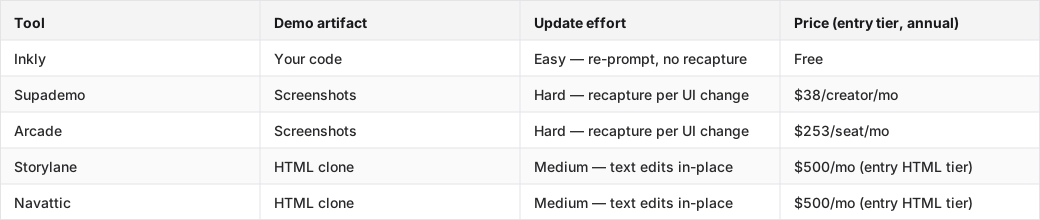
When the demo lives next to the product
Code-native ownership means the demo is not a separate marketing asset sitting in someone else's SaaS. It lives in the codebase and gets updated the same way the product does. When your nav changes, your agent updates the demo in the same commit. When you need a per-customer variant, you prompt again instead of re-recording. Version control, PR review, rollback, all the boring machinery you already use for product changes, applies to the demo too. That's the shift this table is really measuring.
Why recorder-first tools feel fast and then get expensive
Arcade's capture flow is genuinely good. You can make a polished, shareable demo in under an hour, with no engineering setup, and embed it cleanly on a marketing page or launch post. For a team that ships rarely and cares most about first impressions, that's a strong default.
The problem shows up on the next UI change. With a screenshot-based tool, every affected screen needs a fresh capture. There is no in-place layout edit. The artifact is a recording, not code, so structural changes usually mean starting over on those screens. On Arcade's self-serve Growth tier ($253/seat/mo annual), HTML capture is not available anymore — it moved to Enterprise in May 2026. So on the tier most founders would actually buy, you are stuck in the recapture cycle no matter how often you ship.
Arcade vs. code-native alternatives on update effort
The maintenance comparison gets a lot simpler once you know what kind of artifact each tool produces. G2's overview of Arcade alternatives and Gartner Peer Insights both surface the same shortlist — Supademo, Storylane, Navattic — but neither one ranks them by update effort. That's the gap this article is trying to fill.
Screenshot capture, HTML clone, and demo-as-code are not the same job
Screenshot tools (Arcade Growth, Supademo Scale) capture the product as images. They are fast to make, need no engineering setup, and look polished at first glance. The update cost grows with the number of affected screens. If a nav restructure touches eight screens, you are doing eight recaptures. On the self-serve tier, there is no workaround.
HTML clone tools (Storylane Growth, Navattic Base) capture the live DOM. Text and data edits happen in place. You can swap copy, change a number, or update a label without re-cloning. Structural UI changes, like a new component, a layout shift, or a nav restructure, still require re-cloning the affected pages. So the update cost is lower than screenshot tools for content changes, and higher for structural ones.
Code-native tools (Inkly) produce demo code that lives in your repo. Updates go through the same workflow as product changes: prompt the agent, review the diff, ship. No re-record, no re-clone, no separate editor. The demo stays honest because it is code, not a frozen snapshot.
What a nav change costs on each kind of tool
Say you restructure the top nav. Three items move, one gets renamed, and one disappears. On a screenshot tool, every screen that shows the nav needs a new capture. On an HTML clone tool, you re-clone the affected pages and re-annotate the steps. On a code-native tool, you just prompt: "update the nav to match the current product," and the agent makes the change across every screen in the demo. The key difference is that the code-native path scales with the prompt, not with the number of screens.
Which Arcade alternative keeps demos synced when the product changes
Once the artifact type is settled, the maintenance question gets a pretty clean answer: code-native tools stay synced because the demo and the product share the same update path. The others need a separate manual step every time the product ships.
How git-based versioning changes the maintenance loop
When the demo is code in your repo, version control is just there. You can see exactly what changed between the demo you showed investors last week and the one that matches this week's build. You can roll back a demo change that broke something. You can branch a demo for a specific customer pitch and merge it back later. None of that happens when the demo lives in a SaaS editor. Version history on Arcade is Enterprise-only, and even then it is the vendor's version history, not yours.
For teams shipping weekly, that compounds fast. A demo that is a few commits behind the product is awkward on a prospect call, and it gets worse the longer it sits there. Git-based demos do not drift because they live beside the code that is changing.
Where AI-assisted updates actually help
The real leverage for Cursor, Claude Code, or Codex is not generating a first demo from scratch. It is making changes quickly when the product code changes. A coding agent that can read your product's current state and re-author the demo to match it is a different tool from one that generates a one-time recording. Inkly's bring-your-own-agent model is built around that idea. The demo is code your agent already knows how to read and modify, so a UI change becomes a prompt instead of a whole workflow.
That said, the bring-your-own-agent path does have a real tradeoff. If you are not already using Cursor or Claude Code day to day, there is setup work here. Inkly does not host its own in-app agent yet — that is on the roadmap. For a team already in that workflow, it is basically invisible overhead. For a team that is not, Supademo's all-in-platform flow may be the easier place to start.
Best Arcade alternative for founders, engineers, and GTM teams
The best Arcade alternative depends on which part of the maintenance problem you are actually trying to solve.
Who should pick a code-native tool
Repo-native founders, product engineers, and vibe coders who already use a coding agent are the best fit for Inkly. The demo lives in your repo, updates with a prompt, and is free. The tradeoff is the agent requirement. You need Cursor, Claude, or Codex set up and comfortable before the maintenance advantage really shows up. If you are already there, the difference is significant. If not, it is just one more thing to wire up.
When a polished capture tool still wins
Arcade still wins when the job is "polished embed on a marketing page that updates once a quarter." The editor is the friendliest in the category for non-engineers, the output looks clean on a launch page, and for teams where demo updates are rare, the recapture cost barely matters. Supademo Scale ($38/creator/mo annual) is the better self-serve option for most solo founders who want that same capture-first flow. It is much cheaper than Arcade Growth, and the feature set at that tier is close enough for screenshot demos. Arcade Growth ($253/seat/mo annual) is priced for a funded marketing team, not a solo builder.
The long-term cost most comparison pages skip
Storylane Growth and Navattic Base both land at $500/mo annual, and the feature list at those tiers — Salesforce integration, SSO, presenter seats, dedicated CSM — makes the target customer obvious. They are built for funded GTM teams running a sales engineering motion. The HTML maintenance advantage is real, but the price point is off-budget for a solo founder or small product team. If you are comparing for a SaaS sales team with a real RevOps motion, Storylane Growth or Navattic Base are worth a trial request. If you are comparing on your own budget, both are off-ICP at the tier that actually matters here.
Where Inkly comes in
The basic problem this article keeps circling is simple: most demo tools produce an artifact that is frozen at capture time. It lives in someone else's SaaS, disconnected from the product code that keeps changing. Every UI change creates a gap between the demo and the live product, and closing that gap takes manual work that grows with how often you ship.
Inkly is built on the idea that the demo should be code you own, not a SaaS-locked recording. The Chrome extension capture path gives you the same fast first demo as Supademo: screens captured, annotated, shareable in under an hour. The difference is that the output is code in your repo, not a recording in Inkly's cloud. When the product changes, you prompt your agent and the demo updates. No re-record, no re-clone, no separate editor. The demo stays honest because it moves with the product.
The honest limitation is that you need a coding agent, like Cursor, Claude, or Codex, and a repo workflow. If your team does not work that way yet, the bring-your-own-agent path adds setup. But if you already do, demos as code you own is the maintenance model that actually keeps up with the way you ship.
FAQ
Q: Which Arcade alternative is easiest to author and maintain like software, not like a marketing asset?
Inkly is the closest fit. The demo is code in your repo, and you update it with an agent prompt instead of a recapture or re-clone workflow. You do need a coding agent, like Cursor, Claude, or Codex, plus a repo setup. For teams already there, it is the lowest-friction maintenance model in the category.
Q: How do the top alternatives compare on keeping demos up to date when the product changes?
Screenshot tools (Arcade Growth, Supademo Scale) require recapturing every affected screen after a UI change, so the update cost grows with the number of screens touched. HTML clone tools (Storylane Growth, Navattic Base) handle text and data edits in place but still need re-cloning for structural changes. Code-native tools (Inkly) update through an agent prompt, with no recapture required. The difference shows up fastest for teams shipping weekly.
Q: Which tool best fits a founder or engineer who wants developer ownership and minimal demo maintenance?
Inkly, if you are already running a coding agent. The demo lives in your repo, version-controlled alongside the product, and updates follow the same workflow as product changes. Supademo Scale ($38/creator/mo) is the fallback if you want a self-serve capture tool at a founder-friendly price without the agent setup.
Q: Which alternative is most AI-friendly for building and updating demos with Cursor, Claude Code, or Codex?
Inkly is the only tool in this comparison where the demo artifact is code your agent can directly read and modify. Supademo has its own MCP and AI layer, but those work inside Supademo's platform. Your agent cannot re-author the demo from your repo. AI-friendly, in this context, means the agent updates the demo from the same place it updates the product, not just that it can generate a first draft.
Q: How do pricing and seat limits affect long-term ownership costs for a growing startup?
Arcade Growth ($253/seat/mo annual) and the HTML tiers of Storylane ($500/mo) and Navattic ($500/mo) are priced for funded teams, not solo founders. Supademo Scale ($38/creator/mo) is the most accessible self-serve option in the screenshot tier. Inkly is free. The pricing gap matters most when the demo becomes something you update often. A $500/mo tool you update weekly is a very different line item from a free tool you update through a prompt.
Conclusion
If your demos live in the repo, the right Arcade alternative is the one you can update with the same workflow you use for product changes. Pick one real demo, ship one UI change this week, and see which tool lets you stay honest without a recapture scramble. That test tells you more than any comparison table.
Ship your next demo before the meeting starts
Interactive demos built from your real product and kept current as you ship, done for you.


