Loom alternative interactive demo that lives in your repo
A Loom alternative interactive demo for builders: compare repo-native workflows, update paths, pricing tradeoffs, and which tools fit Cursor, Claude, or Codex u

On a previous project, I shipped a feature that moved our onboarding flow from a three step modal to a sidebar wizard. It took a week to build and looked clean enough. Two days after it went live, I opened the interactive walkthrough I'd built for our highest intent trial signups and realized it was still showing the old modal. Every click, every annotation, every CTA pointed at UI that no longer existed. The person sending that link to prospects had no idea. A loom alternative interactive demo that lives in your repo, gets versioned with the product, and can be updated with a prompt is the only version of this that does not eventually embarrass you.
The SERP is full of "best Loom alternatives" lists that rank on first run polish. None of them explain what happens the Tuesday after you deploy. That's the question this guide answers.
What a Loom alternative interactive demo looks like in a repo
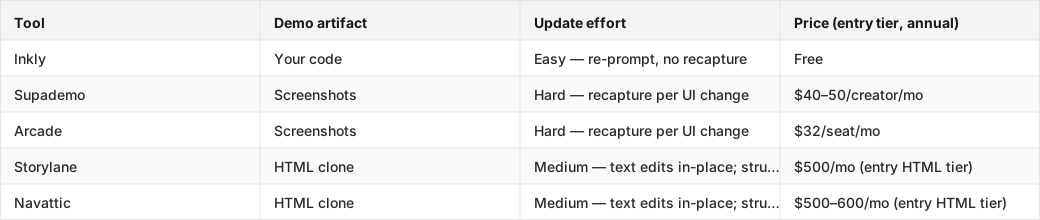
The comparison table below ranks five tools on the thing that matters after launch day: how much work an update costs when the product changes.
Each tool's Update effort rating reflects what you actually do after a UI change, not how fast the first demo ships.
Tools compared: Inkly, Supademo, Arcade, Storylane, Navattic.
The folder the demo should live in
A repo native demo has a predictable shape: a `/demo` directory beside your product code, HTML files or component files the demo renders from, a prompt file that describes the flow, and versioned output your CI can validate. Ownership is a file system fact. If `git log` shows the demo changing when the product changes, you own it. If you have to log into a vendor dashboard to update it, you do not.
Why the hosted file is the wrong mental model
A Loom recording and a Supademo capture share the same problem: the artifact lives in someone else's storage, and updating it means going back to their editor. When your product ships a UI change, the demo does not know. There is no webhook, no diff, no automatic sync. You find out when a prospect sees the old version. A demo that lives in your repo gets updated the same way your product does: a commit, a prompt, a pull request.
How interactive demos update after the next product release
Re-capture, inline edit, or re-prompt
Interactive demo tools split on three update paths, and the cost difference is real.
Re-capture is what screenshot first tools require. You go back to the product, walk through every affected screen, capture each one, re-annotate, re-test. On a tool like Supademo or Arcade, a nav restructure means recapturing every screen that shows the nav. There is no in-place layout edit. The artifact is a screenshot, and screenshots do not reflow.
Inline edit is what HTML clone tools like Storylane and Navattic offer. Text and data changes happen in the editor without a full recapture. But structural changes, like a new step, a moved component, or a redesigned flow, still require re-cloning the affected pages. The entry tier for HTML on both tools starts around $500/month, which is a lot for a solo founder.
Re-prompt is what a code-owned demo enables. The demo is HTML your agent authored. When the product changes, you describe the change in a prompt and the agent updates the demo code. No re-record, no editor session, no recapture pass. This is the update path that fits a weekly ship cadence.
The Tuesday-after-deploy test
Say you ship a pricing restructure on Monday. The demo still shows the old pricing page, a modal with three tiers that no longer exist. On a screenshot tool, you recapture the pricing flow, which touches every screen where pricing appears. On an HTML clone tool, you can swap the pricing copy in the editor, but if the modal became a full page, you're re-cloning. On a code-owned demo, you prompt: "The pricing modal is now a full page with two tiers — $49 and $99. Update the demo flow to match." The agent edits the file. You review the diff. Done.
The PostHog engineering blog documents this kind of maintenance thinking for internal tooling. The point is the same: artifacts that live in the repo stay honest because the same tools that update the product can update them.
Use prompt to create, prompt to update, prompt to branch
AI native demo authoring changes what "maintaining a demo" means. Instead of a manual editor session, you're writing a prompt.
A create prompt that gives the agent enough to work with
A useful create prompt has four parts: what the product does, who the demo is for, which flow to show, and what the CTA is at the end. Something like: "Build an interactive demo for a B2B SaaS expense tool. The viewer is a finance manager. Show the flow from uploading a receipt to approving a report. The final screen should show a 'Book a call' button." That's enough for an agent to produce a first draft. The Chrome extension capture path, screenshot the live flow first, then prompt the agent to turn it into code, gives you a faster starting point for demo one.
An update prompt for the next release
The update prompt works against existing code, not a blank slate. "The receipt upload screen now has a drag and drop zone instead of a file picker. Update the demo to show the new UI on that step. Keep everything else the same." The agent edits the relevant file. You diff it. This is the difference between editing a demo and rebuilding one. Editing touches the changed parts. Rebuilding starts over.
A branch prompt for variants and channels
The same base demo can produce a sales variant, a website embed, an onboarding walkthrough, and an investor version, each with a single prompt. "Take the base demo and produce a version for a healthcare compliance buyer. Replace the company name with MedCore, use healthcare specific receipt categories, and change the final CTA to 'Request a compliance review.'" No separate manual workflow per channel. The Vercel headless commerce guide makes a similar argument about content variants: one source of truth, rendered differently per context. Same principle applies to demos.
Pick the Loom alternative interactive demo by workflow, not by polish
Cursor and Claude Code users need a different fit
If you're already prompting your way through product work in Cursor or Claude Code, a hosted demo tool is a context switch. You're used to describing changes in natural language and reviewing diffs. A demo tool that puts you back in a point and click editor for every update is friction you do not have to accept. The right fit for a coding agent user is a tool where the demo is code, something your agent can read, edit, and commit alongside the product. That's a different shortlist than "which tool has the nicest first run capture flow."
When a hosted editor is enough
Screenshot first tools are the right call when you need one demo, you're not shipping UI changes often, and you do not have a coding agent set up. Supademo's capture flow is fast and the output looks polished. Arcade's embeds are clean for a landing page or a launch post. If you ship a stable product and demo it quarterly, the recapture cost is low enough to ignore. The tradeoff stops making sense the first time you ship a meaningful UI change and realize every affected screen needs a new capture pass.
Compare the best Loom alternative interactive demo tools
The tools that win on first capture
- Supademo — the fastest path to a shareable demo if you do not have a coding agent and need something out the door today. The capture flow is the most polished in the category for non engineers, and the Supademo Scale tier ($40–50/creator/month) includes HTML capture. On a screenshot first tool, though, HTML capture still means recapturing when the underlying UI changes. Honest tradeoff: every UI change that touches a captured screen means a recapture pass. Worth it for stable products; expensive for teams shipping weekly.
- Arcade — pick this if your demo lives on a marketing page and the bar is "looks good on first view." The Pro tier ($32/seat annual) is the friendliest embed flow for non engineers. HTML capture is Enterprise only (sales call required), so on Pro you're committing to the same recapture per UI change cycle as Supademo. Fine for a landing page that updates once a quarter; painful for a product that ships every sprint.
The tools that win on ownership
- Inkly — the demo is code you own, built through a three prompt loop: prompt to create, prompt to update, prompt to produce variants. A UI change means a re-prompt, not a recapture. HTML demos are available from the only tier there is, free, which is a real contrast to Supademo's $40–50/creator gate and Arcade's Enterprise only wall. The honest limitation: you need a coding agent (Cursor, Claude, Codex) and a repo workflow. If your team does not work that way yet, the bring your own agent path is extra setup. If you do, it's the only tool where your demo lives in your repo and updates like the product does.
The tools to skip for a code first team
- Storylane — HTML clone plus screenshot capture, with text and data edits that work in place. The Starter tier ($40/seat) is screenshot only; HTML, the capability this comparison ranks on, starts at Growth ($500/month annual, trial request required). The feature list at Growth (Salesforce, SSO, Deal Intelligence, presenter seats) tells you who it's built for: funded sales teams with a GTM motion. Not the right fit for a solo founder or a product engineer who wants a lightweight, agent maintainable demo.
- Navattic — similar positioning to Storylane: HTML clone, GTM team features, Base tier starting around $500–600/month. One HTML demo on the free tier, which is useful for evaluating the format. The pricing and feature set point at mid market sales teams, not indie hackers or product engineers. According to research on product-led growth tooling, the tools that stick with builder shaped teams are the ones that fit the repo workflow. Navattic's editor first model does not.
Where Inkly comes in
The problem the article just described isn't a Loom problem. It's an artifact location problem. When the demo lives in someone else's SaaS, every product change creates maintenance debt that compounds with every release. The right structural answer is a demo that lives where the product lives: in your repo, versioned, readable by your agent.
Inkly is built on that premise. The demo is HTML code you own, created from a prompt, updated from a prompt, branched for a new customer from a prompt. There's no recapture cycle because there's no screenshot to reshoot. Your coding agent (Cursor, Claude, Codex) reads the demo code the same way it reads the product code, and a UI change becomes a diff review instead of an editor session. HTML demos are available at the only tier there is, free, so the capability the other tools gate behind $500/month is the default starting point. The honest tradeoff: bring your own agent is the MVP path today; a hosted in app agent is on the roadmap but not shipped. If you're already working in Cursor or Claude Code, that's not extra setup. It's the same loop you're already in. Start with one existing walkthrough and try to reproduce it as code you own.
FAQ
Q: Which Loom alternative is best if I need an interactive demo that can be updated after every product release without re-recording?
Inkly is the strongest fit here. The demo is code your agent updates from a prompt, so a UI change means a re-prompt, not a recapture. If you do not have a coding agent set up yet, Storylane or Navattic offer HTML clone demos where text and data edits happen in place without a full recapture, though structural changes still require re-cloning and both tools start at $500/month for HTML access.
Q: Can an interactive demo be owned and maintained like code, with versioning or repo based workflows?
Yes. When the demo is generated as HTML or component code, it can live in a `/demo` directory in your repo, be committed alongside product changes, and be maintained by any coding agent. The line between code owned and hosted is simple: if `git log` shows the demo changing when the product changes, you own it. If you have to log into a vendor dashboard to update it, you do not.
Q: What is the best Loom alternative for a founder or indie hacker who wants fast updates and minimal rework?
Inkly, free, HTML demos from the start, and updates via a re-prompt rather than a re-record. Supademo is the fallback if you need a demo today and do not have a coding agent set up, but every UI change after that will cost you a recapture pass on every affected screen.
Q: Which tool is best for a product engineer who cares about workflows, ownership, and technical maintainability?
Inkly is the only tool in this category where the demo artifact is code you can read, diff, and commit. Every other tool stores the demo in their platform. For a product engineer already working in Cursor or Claude Code, the three prompt loop (create, update, branch) fits the existing workflow without a context switch to a point and click editor.
Q: How do interactive demos compare with Loom for converting visitors and explaining a product clearly?
Loom is a passive recording. The viewer watches. An interactive demo is clickable, which means the viewer goes through the actual flow rather than watching someone else do it. The practical difference is that a Loom is a one take artifact; an interactive demo can be personalized per viewer, branched per channel, and updated when the product changes.
Conclusion
The repo native question from the opening is the right one to end on: if the demo is going to live with the product, it should update the same way the product does. Pick the tool that makes the demo code your agent can touch. Then take one existing walkthrough, a Loom recording, a Supademo capture, anything, and try to reproduce it as a code owned demo. Run a deploy. See which workflow survives the next release. That test tells you more than any comparison table.
Shortlisting tools? How Inkly compares once the feature tables stop being enough.
Ship your next demo before the meeting starts
Interactive demos built from your real product and kept current as you ship, done for you.


