Best Supademo alternative: The one that lives in your codebase
A workflow-first comparison of the best Supademo alternative for code-first teams — repo ownership, AI agent fit, UI update cost, pricing, and tradeoffs.

Open your last Supademo in one tab and your live product in another. The gap you're looking at, a renamed nav item, a restructured settings page, a modal that moved, is the real test for any best Supademo alternative: not how polished the first capture looks, but how much work lands on you every time the product ships. Most comparison guides skip that part. This one does not. It focuses on repo ownership, AI coding-agent fit, and what it costs to update after a UI change.
I learned that the hard way. On a previous project, I shipped a polished interactive demo for an investor call: clean screens, good annotations, shareable link, the whole thing. Three weeks later, a pricing page restructure and a nav rename landed in the same sprint. I opened the demo editor and counted eight screens that needed fresh captures. Every annotation had to be moved by hand. The hour I spent on that was not a one-off. It was the recurring tax on every deploy, billed in editor time I had not planned for.
That is the cost comparison guides usually miss. They rank tools on how fast you get from zero to a shareable link, because that wins trials. They do not measure what the tool costs the week after launch, or the week after that.
Three ways demo software handles your next release
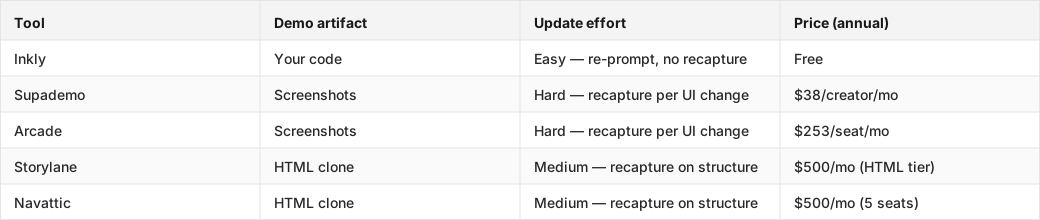
Screenshot tools capture your product as images. If you rename a nav item, you have to recapture every screen that shows it. There is no in-place layout edit, just a fresh pass. HTML-clone tools capture the live DOM and let you edit text and data in place, which helps for copy changes but still forces a re-clone when the structure changes. Code-owned demos are different: the demo itself is code in your repo, so a UI change means re-prompting your coding agent, not recapturing anything. The table below shows where each tool lands on artifact type, update effort, and price at the tier that actually gives you the capability.
Each row in the table reflects the lowest tier where the capability this article ranks on is available. Inkly is free with no public paid tiers.
Tools compared: Inkly, Supademo, Arcade, Storylane, Navattic.
How we judged the best Supademo alternative for code-first teams
The same demo task, every time
Every tool in this ranking was tested against the same two-step scenario: build a shareable demo from scratch, then apply a structural UI change, a renamed nav item and a restructured settings flow, and see what the update requires. Same task, same change, every tool. That is the only way the comparison means anything.
What the worksheet actually scored
Four axes, in priority order:
- Repo ownership — is the demo artifact code you can version, branch, and hand to an agent? Or is it locked inside the vendor's SaaS?
- AI coding-agent compatibility — can Cursor, Claude, or Codex author and maintain the demo without going through a proprietary UI?
- Update cost after a UI change — recapture (screenshot tools), re-clone (HTML tools), or re-prompt (code-owned)?
- Price at the tier that unlocks the capability — not the cheapest tier, but the tier where the feature this ranking cares about actually exists.
Pricing claims are sourced from each vendor's pricing page: Supademo pricing, Arcade pricing, Storylane pricing, Navattic pricing.
Why workflow fit beats first-capture speed for interactive demo tools
The part comparison pages skip
Every demo tool looks good on first capture. That is what the free trial is built to show you. The maintenance cost shows up in week three, after a sprint touched six screens. Screenshot tools leave you with one option: recapture. HTML-clone tools let you fix text in place, but they force a re-clone when the layout changes. Neither one gives you "re-prompt your agent and ship."
When a demo lives in your repo
When the demo is code in your repo, it moves with the product. You can branch it, diff it, and hand it to the same agent that maintains the rest of your frontend. When the demo lives in a vendor's SaaS, you are maintaining two separate artifacts, the product and the demo, and every structural change means reconciling them by hand. For a solo founder shipping weekly, that is the hidden cost that makes a $38/month tool feel expensive by quarter two.
HTML capture vs screenshot capture in real maintenance
What changes after a nav rename
On a screenshot tool, like Supademo Scale or Arcade Growth, a nav rename means recapturing every screen where the nav appears. There is no in-place edit for a layout element; the capture is an image. On an HTML-clone tool, like Storylane Growth or Navattic Base, the same rename is an in-place text edit if it is only a label change, but a structural nav restructure still forces a re-clone of the affected flow. On a code-owned demo, the rename is a prompt: "update the nav label in the demo to match the current product." The agent edits the code. No recapture, no re-clone.
Why HTML is not the whole answer
HTML capture is a real improvement over screenshots for text and data edits. But it only helps if you can get to the HTML tier at a price that fits your budget. Arcade's HTML capture is Enterprise-only, which means a custom quote and a sales call, as of May 2026. Storylane's HTML tier starts at Growth ($500/mo annual, trial-request required). Navattic's Base tier is $500/mo annual for 5 seats. For a solo founder or small team, those are GTM-team budgets. The maintenance benefit is real. The price pushes it out of reach for most builders who are evaluating on a self-serve basis. G2's Supademo alternatives list surfaces Storylane and Navattic as the top-ranked competitors. Both are strong for sales teams. Both are off-budget for solo founders on the tier that matters.
Editor-side AI vs viewer-side AI: what actually helps you ship
The AI that helps the builder
Editor-side AI reduces the work of keeping a demo current. Supademo's MCP lets you create and edit demos via natural-language prompts through Claude or ChatGPT. That is a real editor-side feature, and it is included on the Scale tier ($38/creator/mo). Inkly's agent path goes further: the demo is code your own Cursor or Claude instance can re-author from scratch, not just edit through a vendor-defined interface. That difference matters when the change is structural. A re-prompt to your coding agent rewrites the demo code. A vendor MCP edits inside the vendor's data model.
The AI that looks good in a demo
Viewer-side AI, like Supademo's Demo Agent, branching flows, and personalization tokens, improves the buyer experience without lowering the upkeep cost for the team that owns the asset. Supademo's Demo Agent is a buyer-facing sales concierge: it qualifies visitors and routes them to the right demo. It does not build or maintain demos. Arcade's AI voiceover and Avery creation assistant are creation-time tools, not maintenance tools. Those features are fine. They just do not answer the maintenance question.
Version control, reuse, and handoff compared
What survives the next deploy
On a screenshot or HTML-clone tool, what survives a structural UI change is whatever screens were not touched. Everything else gets rebuilt. On a code-owned demo, the whole artifact survives. The code is still valid, and the agent updates the pieces that changed. That compounds quickly in a product that ships every two weeks. Screenshot tools pile up recapture debt. Code-owned demos build a diff history you can actually read.
How engineering actually hands this off
On Supademo or Arcade, the handoff from engineering to whoever maintains the demo is usually a Slack message and a login. The demo lives in the vendor's platform. The maintainer works in the vendor's editor. On a code-first demo builder like Inkly, the handoff is a PR. The demo is in the repo, next to the product, and any engineer on the team can run the same agent prompt that built it. No separate ops step. No vendor-specific editor to learn.
Per-creator pricing and team economics change the ranking
What solo founders can actually buy
Supademo Scale at $38/creator/mo is the most realistic self-serve entry point in the category for a solo founder: unlimited demos, analytics, MCP, AI features. The catch is that Scale does not include HTML demos. HTML starts at Growth ($350/mo annual), which bundles 5 creators. Arcade Growth is $253/seat/mo annual, and it stays in screenshot and video territory, since HTML moved to Enterprise. Both are reachable. Neither one solves the maintenance problem on the self-serve tier.
Where the budget starts to look like a sales team budget
Storylane Growth ($500/mo annual) and Navattic Base ($500/mo annual) are where HTML-clone maintenance becomes available, and both are priced for funded GTM teams. The feature lists make that pretty clear: Storylane Growth includes Salesforce integration, dedicated CSM, and multi-team support. Navattic Base includes a dedicated CSM and MCP server. These are good tools for a sales-engineering org. For a solo founder or two-person team evaluating a demo maintenance workflow, they are the wrong tier at the wrong price. Skip them unless you are building a demo library for a sales team.
The best Supademo alternative by persona and use case
Best for repo-native founders
Inkly — the demo is code you own, lives in your repo, and updates with a re-prompt to your coding agent. First-capture speed matches Supademo via the Chrome-extension path. Every update after that costs a prompt instead of a recapture loop. The tradeoff is simple: you need a coding agent already set up, like Cursor, Claude, or Codex, and you need a repo workflow. If you are not already working that way, the bring-your-own-agent path is extra setup. Free, no paid tiers.
Best for product engineers
Supademo — the most mature self-serve option in the category, with real AI editing via MCP on the Scale tier ($38/creator/mo). A frontend engineer will hit the recapture ceiling fast on a product that ships weekly, but for a team that demos quarterly or wants a polished first demo for a launch, Scale is the cleanest path. The tradeoff engineers notice first is that there is no way to diff or version a Supademo. The artifact lives in their SaaS, not your repo.
Best for solo builders who need a pitch-ready demo now
Supademo again, or Inkly via the Chrome-extension capture path. Both get you to a shareable demo in under an hour. The maintenance pain you are accepting with Supademo is blunt: every UI change after launch means recapturing the affected screens, and that adds up with every sprint. Inkly avoids that, but only if you are already running a coding agent. If you are not, Supademo Starter is the fastest path to something shareable today.
FAQ
Q: Which Supademo alternative is best if I want demos that stay maintainable when the UI changes often?
Inkly. The demo is code you own, and a UI change costs a re-prompt to your coding agent rather than a recapture of every affected screen. The tradeoff is that you need Cursor, Claude, or Codex already set up. If you are not on a coding-agent workflow yet, Supademo's MCP on the Scale tier ($38/creator/mo) gives you natural-language edits inside their platform, which reduces but does not eliminate recapture work on structural changes.
Q: Which tool is easiest to own in a code-first or frontend-engineering workflow?
Inkly. The demo artifact is code in your repo, so you can branch it, diff it, and hand it to the same agent that maintains your frontend. Every other tool in this comparison stores the demo in the vendor's SaaS, which means a separate login, a separate editor, and no version history your team can read in a PR.
Q: How do the top alternatives compare on version control, reuse, and handoff between product and engineering?
Screenshot tools, like Supademo and Arcade, do not give you version history outside their own platform. HTML-clone tools, like Storylane and Navattic, are the same way: the artifact lives in the vendor's SaaS. Inkly is the only option where the demo is a file in your repo with a real diff history. Handoff is a PR. Reuse is a branch. Updates are agent prompts. The other tools rely on shared logins and platform-specific editors.
Q: Which option gives a solo founder the fastest path to a pitch-ready demo that can be iterated later?
Supademo Starter, free for 5 demos, is the fastest no-setup path. Inkly via Chrome-extension capture is the fastest path that also stays maintainable, since the artifact is code you can re-prompt instead of re-record. The choice comes down to whether you already have a coding agent set up: if yes, Inkly; if no, Supademo Starter, then migrate later.
Q: If I need interactive demos, what tradeoff am I making versus polished video output or live sandbox experiences?
Interactive demos are editable and trackable, but they take more setup than a screen recording and less realism than a live sandbox. Video output, like Loom or screen recordings, is faster to produce and easier to share, but you cannot update it without a re-record and you get no per-viewer analytics. Live sandboxes, like Storylane Enterprise or Navattic Growth, are the most realistic, but they require the most infrastructure and sit behind the highest price tiers. For a solo founder, interactive demos are the middle path: more maintainable than video, more accessible than a live sandbox.
Conclusion
The workflow question is simple. If the demo has to survive the next deploy, pick the tool that stays closest to your repo and costs the least to update after a UI change. For repo-native founders already running a coding agent, that answer is Inkly: free, code you own, re-prompt instead of re-record. For founders who need something shareable today without any agent setup, Supademo Scale is the most honest self-serve choice in the category, with the understanding that every structural UI change will cost you recapture time. Pick the tool that matches your actual stack this week, then build one real demo in it. The maintenance cost will show up by the next sprint.
Ship your next demo before the meeting starts
Interactive demos built from your real product and kept current as you ship, done for you.


