Best AI demo software: Tools that live in your repo
Compare the best AI demo software for builders, with a repo-first lens on ownership, prompt-based updates, personalization, analytics, pricing, and upkeep.

Ship weekly for a quarter and your demo goes stale about thirteen times. With a screenshot-based tool, each of those thirteen moments means the same tedious loop: open the tool, walk through the affected screens again, add the notes again, publish again. That maintenance cost rarely shows up in comparison tables. The best AI demo software is the one you can keep in your repo and update with prompts, not the one that looks best on day one.
Why ownership decides the best AI demo software
Most comparisons of AI demo tools focus on first-impression polish: how fast can you ship a shareable link? That matters once. After that, it is the wrong question.
The real question is where the demo artifact lives. If it is a recording inside a vendor's SaaS, every UI change creates a recapture problem. If it is code in your repo, a UI change is just a prompt update to the same file.
The repo-native split
Ownership means one thing in practice: can your coding agent (Cursor, Claude, Codex) open the demo, read it, and rewrite the relevant parts when the product changes? If the demo is a screenshot sequence locked inside Supademo's dashboard, the answer is no. You are back in the editor, clicking through screens. If the demo is HTML in your repo, the agent can re-author it from a prompt the same way it re-authors any other file.
That is the split the AI demo tools category does not advertise. Capture-first tools optimize for demo #1. Code-native tools optimize for every demo after that.
What breaks when the demo lives elsewhere
The structural cost is not the first recapture. It is the compounding. A product that ships weekly drifts away from the demo faster than any manual editing workflow can keep up. The buyer can change text in the demo editor, but they cannot change the artifact model: screenshot-based demos require recapture per affected screen; HTML-clone tools handle text swaps in place but re-clone on structural changes; code-owned demos re-render from the new code through a single agent prompt.
The Vercel team's write-up on AI agent development makes a point that fits here: agents that work on structured, code-native artifacts can make scoped changes reliably. A screenshot is not a structured artifact. There is nothing for the agent to rewrite.
Compare AI demo software by artifact, update path, and upkeep
The table below shows the three things that actually decide maintenance cost: what the demo artifact is, how hard a UI change is to absorb, and what the entry price looks like.
Tools compared: Inkly, Supademo, Arcade, Storylane, Navattic.
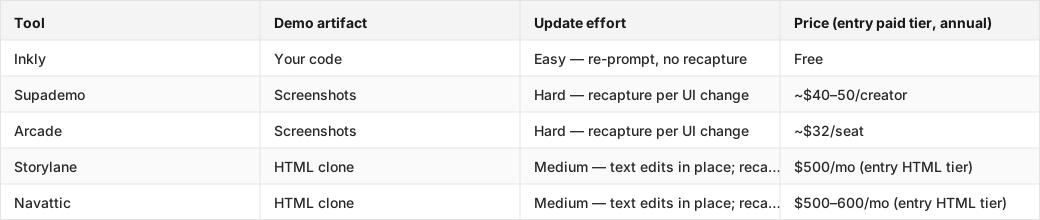
The table that shows who owns what
Inkly emits code you own. Every other tool in the table stores the demo on their infrastructure, in their format. That is not a philosophical distinction. It decides who can update the demo, how, and at what cost per release.
What a UI change costs on each kind of tool
Three update paths exist in interactive demo software, and they produce very different amounts of work per release.
Recapture (Supademo, Arcade): every screen that changed needs to be re-walked, re-captured, and re-annotated. On a nav restructure that touches eight screens, that is eight passes. The work scales with the number of affected screens.
Inline edit (Storylane, Navattic HTML): text and data fields update in place. But structural changes — a new modal, a reordered sidebar, a redesigned onboarding step — require re-cloning the live product HTML. Faster than full recapture, but still not a prompt.
Agent prompt (Inkly): the demo is code. Re-prompt your agent against the existing file. No re-recording, no re-clone. Same workflow you use to update any other file in the repo.
Pick the tool that lets your AI coding agent update the demo
The phrase "AI demo software" covers two different things: tools that use AI to help you create the first demo, and tools where an AI agent can actually maintain the demo after the product changes. Most tools do the first. Almost none do the second.
Prompt-to-create is only half the promise
Supademo has an MCP that lets Claude or ChatGPT create and edit demos through natural language. That is real, and it is worth naming. But the output still lives in Supademo's SaaS. When the product ships a UI change, the agent cannot open that artifact and rewrite the affected screens the way it would rewrite a component file. The agent is a front-end to Supademo's editor, not an author of code-native demo software.
The harder proof point for any code-native demo software claim is this: can the same agent that built the demo update it after release, without going through a separate vendor UI? PostHog's write-up on building an AI envoy shows why that distinction matters. Agents that work on real code artifacts can be given scoped tasks and trusted to complete them. Agents operating on SaaS-locked recordings cannot.
Cursor, Claude, and Codex are the real workflow test
The test is simple: push a UI change on a branch, then try to update the demo. On Supademo or Arcade, you open the capture tool and re-walk the affected screens. On Storylane or Navattic, you re-clone the changed pages. On Inkly, you open the demo file in Cursor, describe the change, and the agent rewrites the relevant sections. It is the same loop you use for any other code change in the repo.
That is the workflow test. If your demo cannot live next to your product code and be maintained by the same agent that maintains your product code, it is not really code-native demo software. It is a SaaS tool with an AI-flavored create flow.
Choose AI demo software that handles personalization without chaos
Per-customer variants are where the recapture model gets ugly fast. A founder running outbound to ten accounts does not need ten demos. They need one base flow with different logos, different sandbox data, and different copy per account.
Variants that belong in the repo
When the demo is code, branching is a repo operation. The base demo is one file. A per-account variant is a prompt that says, "take the base demo, swap the logo to Acme Corp, update the dashboard data to reflect their industry, and change the CTA copy." The agent produces a new file. Version control tracks both. No separate tool, no cloning inside a vendor dashboard.
On screenshot-based interactive demo tools, a per-account variant means re-recording or manually editing every screen that shows customer-specific content. On HTML-clone tools, it means re-cloning with different seed data. Neither approach scales past a handful of accounts without turning into a part-time job.
Per-account tweaks without rebuilding the whole thing
The practical version of this: a sales-adjacent founder wants to send a tailored demo to a prospect before a call. On Supademo, that means opening the editor, finding every screen with the prospect's industry-specific content, editing each one, and re-publishing. On Inkly, it is one prompt to the agent: "produce a variant of the base demo for a logistics company, replace the dashboard data with freight metrics, update the company name throughout." The agent handles it; the base demo stays untouched.
This is the "prompt to produce variants" loop. The same mechanism that makes updates cheap makes personalization cheap. Stripe's research on AI agents handling real coding tasks shows that scoped, code-native tasks are exactly where current agents perform reliably. A per-account demo variant is a scoped, code-native task.
Balance analytics and integrations without giving up control
The integration layer should not own the demo
Analytics, CRM sync, and lead routing are useful only if they sit around the demo, not inside it. A tool that requires you to host the demo on their infrastructure to get view tracking has made the integration layer the reason to stay on their platform. That is lock-in dressed as a feature.
The repo-native model keeps the source of truth in your codebase. Tracking layers connect to the demo's hosted URL; they do not own the artifact. When you want to switch analytics providers or add a new CRM field, you update the integration, not the demo.
What sales teams actually need from tracking
The minimum useful stack for a founder-led sales motion is completion rate per demo session, drop-off by screen, and a CRM handoff when a prospect finishes. Inkly covers views and visitors in the MVP. Connecting your own analytics (PostHog, for example) is near-term. Contact the team to onboard today; it is not self-serve yet.
Supademo and Arcade both include demo analytics on their paid tiers. Storylane and Navattic include deeper CRM integrations (Salesforce, HubSpot) at their Growth tiers, the same tiers where HTML capture unlocks. That means the analytics and the HTML fidelity are bundled at $500/mo+. For a solo founder, that is a meaningful price jump for features they may not need yet.
Where Inkly comes in
The structural problem this article started with is simple: demo tools optimize for the first demo and leave the maintenance cost invisible. Every UI change on a screenshot tool is a recapture problem. Every per-customer variant on a SaaS-locked tool is a rebuild. That compounds quickly when you ship weekly.
Inkly is built on the idea that the demo should be code you own. Same repo, same agent, same workflow as everything else you ship. Create it with a prompt or a Chrome capture, update it with a prompt when the product changes, produce a per-account variant with a prompt when a prospect needs one. No re-recording, no re-clone, no vendor dashboard.
The honest tradeoff: Inkly requires a coding agent (Cursor, Claude, Codex) and a repo workflow. If your team does not work that way yet, Supademo's all-in-platform flow is the cleaner starting point. But if you already prompt your way through the product, keeping the demo in your repo is the same workflow, not extra setup.
FAQ
Q: Which AI demo software is easiest to keep aligned with a product that ships every week?
A code-native tool like Inkly, where the demo is a file your agent can rewrite from a prompt. Screenshot-based tools (Supademo, Arcade) require recapturing every affected screen after a UI change; HTML-clone tools (Storylane, Navattic) handle text swaps in place but re-clone on structural changes. The tool that updates with a prompt is the tool that stays aligned without recurring recapture work.
Q: Which tools let a product engineer own the demo in the repo instead of in a separate vendor UI?
Inkly is the only tool in this comparison that emits the demo as code you own, moveable to your repo and maintainable by any agent. Supademo, Arcade, Storylane, and Navattic all store the demo artifact on their infrastructure. Supademo's MCP lets an agent talk to their editor, but the output stays in their SaaS.
Q: Can an AI coding agent create or update the demo from prompts without rebuilding it manually?
Creating from a prompt is available in several tools (Supademo via MCP, Inkly via the three-prompt loop). Updating from a prompt without rebuilding is the harder proof point. It requires the demo to be code the agent can actually rewrite. On SaaS-locked tools, the agent is a front-end to the vendor's editor. On Inkly, the agent rewrites the actual demo file. Prompt-to-create is table stakes. Prompt-to-update is the differentiator.
Q: How much maintenance does each tool require when the product UI changes?
Three tiers: recapture per affected screen (Supademo, Arcade), inline edit for text with re-clone on structural changes (Storylane, Navattic HTML tiers), and agent re-prompt with no recapture (Inkly). Maintenance cost scales with how often the product ships. Weekly shippers pay the recapture cost thirteen-plus times a quarter on screenshot tools.
Q: Which tools are best for a founder who wants a demo that stays current with minimal ongoing effort?
Inkly, if you have a coding agent set up. The update path is a prompt, not a re-record. Supademo is the right call if you do not have a coding agent yet and need the fastest path to a first shareable demo; the maintenance cost is real but manageable if the product ships infrequently. Storylane and Navattic are better fits for funded sales teams than for solo founders. The HTML tier that makes maintenance tractable starts at $500/mo.
Conclusion
If you ship weekly, the demo tool that looks cheapest at signup is rarely the one with the lowest total cost. Recapture work is invisible on the pricing page and compounds every release. The right call is the tool where a UI change is a prompt, not a pass through the capture flow.
Run the test this week: push one UI change through your current tool and track what the update actually requires — recapture, re-clone, or re-prompt. That single data point tells you more about your tool's real maintenance cost than any comparison table. If the answer is anything other than a prompt, you are paying in time every time you ship.
Ship your next demo before the meeting starts
Interactive demos built from your real product and kept current as you ship, done for you.


