Click through demo software: Buy the repo or buy the layer
Compare click through demo software by ownership, upkeep, personalization, analytics, and team fit. See when repo-owned demos beat SaaS capture tools.

On a previous project, I shipped a product walkthrough for our highest-intent prospects. It was HTML-captured, cleanly annotated, and embedded on the site by Thursday. By the following Tuesday, I opened it to prep for a call and noticed the pricing modal it walked through had been redesigned over the weekend. The demo still showed the old version. Not slightly off. Structurally wrong. I had forty minutes before the call and no way to fix it without going back through every affected screen.
That is the moment click through demo software stops being a "which tool looks best" question and turns into an architecture question: do you own the demo in code, or did you buy a capture layer that lives in someone else's SaaS?
Click through demo software is a decision about ownership, not polish
The artifact you can edit later
Every click through demo software tool produces an artifact. The real question is where that artifact lives after you ship it. Screenshot based tools (Supademo, Arcade) produce a recording inside their platform. You edit it through their UI, and when the product changes, you recapture. HTML clone tools (Storylane, Navattic) produce a richer clone, still locked inside the vendor's cloud. Code native tools produce the demo as actual code, files that live in your repo and can be edited by any agent.
That location determines maintenance. If the artifact is in someone else's SaaS, every UI change goes through their editor. If it's code you own, your coding agent handles it.
What the reader is actually buying
Two layers are on the table. The first is a captured demo layer: fast to create, polished on day one, maintained through the vendor's editor. Supademo's docs confirm the re capture model, and structural UI changes mean recapturing affected screens. The second is a code owned demo: the demo is HTML/code in your repo, authored by your agent, updated by re prompting rather than re recording.
The buying choice is not about features. It's about which update workflow your team will live with every sprint.
Compare click through demo software by the thing that breaks after shipping
A few months ago I was working through a nav restructure. The product moved three top level items and renamed two of them. On a screenshot based tool, that's eight screens to recapture, re annotate, and re sequence. On an HTML clone tool, text and data changes happen in place, but structural layout changes still require re cloning. On a code native tool, I re prompted the existing demo code and the nav updated across every screen in one pass.
The comparison guides on the SERP measure capture speed. None of them measure what that nav restructure costs you the week after launch.
What changes when the UI changes
The update paths are genuinely different in kind, not just in effort. Screenshot tools require a fresh capture pass for every screen the UI touched. There is no in place layout edit. HTML clone tools handle text and data edits in place, which is real progress, but structural changes such as layout, navigation, or modal flow still trigger a re clone. Code native tools update from a prompt against the existing code. The agent reads the current demo files and applies the change without a re record.
A useful self test, per Stripe's documented approach to agent workflows: push a UI change on a branch, then try to refresh the demo. The mechanism each tool uses to handle that refresh is the most honest signal of what maintenance will cost you at scale.
The comparison matrix the SERP is missing
This table ranks interactive demo tools on the axis that decides long term cost: update effort after a UI change.
Tools compared: Inkly, Supademo, Storylane, Navattic, Arcade.
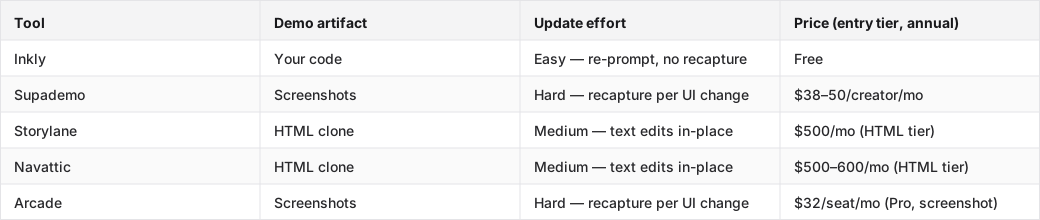
Rank the major click through demo software options by architecture
Here is how guided demo software stacks up when you rank by update cost, not launch day polish.
Screenshot-first tools
1. Supademo — the fastest path to a first demo if you need something shareable today without a coding agent. The capture flow is the cleanest in the category, and the AI inline edit tools handle minor copy changes without a full re record. The honest cost: any structural UI change, like a nav, modal, or layout change, forces recapturing every affected screen. Supademo Scale runs $38–50/creator/month, which is reasonable for teams that ship rarely and expensive for teams that ship weekly.
2. Arcade — strongest for marketing site embeds and PLG launch pages where the demo needs to look polished on first view. The Pro tier ($32/seat annual) is the friendliest non engineering editor in the category. The catch: HTML capture is Enterprise only, so on Pro you're in the same recapture cycle as Supademo. It is the right choice when your demos sit on a landing page that updates quarterly. It is the wrong choice when the product ships every sprint.
HTML and sandbox tools
3. Storylane — the HTML clone path buys down a real category of maintenance pain. Text, data, and copy changes happen in place without a re record. The tradeoff is that structural layout changes still require re cloning, and the HTML tier starts at $500/mo annual (Growth, trial request required). The feature list at Growth — Salesforce integration, SSO, presenter seats, Deal Intelligence — tells you who it's built for: funded sales teams, not solo founders.
4. Navattic — similar HTML clone model to Storylane, similarly priced at $500–600/mo for the Base tier. The free tier includes one HTML demo, which is useful for evaluation. It is a strong fit for RevOps teams that need analytics, routing, and governance across a sales org. It has the same structural change limitation as Storylane.
Code-native demos
5. Inkly — the demo is code you own, built and maintained through a three prompt agent loop: prompt to create, prompt to update, prompt to produce a variant for the next customer. A nav restructure is a re prompt, not a re record. HTML demos are available from the only tier there is, free, which is a real contrast with tools that gate HTML to $500/mo plans. The honest tradeoff: Inkly requires a coding agent (Cursor, Claude, Codex) and a repo workflow. If your team does not operate that way yet, the bring your own agent path is extra setup, and Supademo's all in platform flow may be the cleaner first step.
Choose the click through demo software that fits your team shape
Sales engineers who need a reusable leave-behind
Demo software for SaaS sales engineers lives or dies on reuse and handoff. The demo has to work for live selling, follow up, and async review, and it can't become a support burden every time the product ships. For sales engineers who need branching flows per account and realistic HTML fidelity, Storylane and Navattic are the honest picks. The HTML clone model handles per account data swaps in place, and the analytics show which prospects engaged with which sections. The price ($500/mo and up) is the reality of that capability at the GTM tier.
If the sales motion is founder led or the team is small, Supademo's Scale tier is the practical entry point. Fast capture, clean editor, manageable per creator cost.
Founders and product engineers who live in a repo
If the product ships in code every week, the demo should probably do the same. The build vs buy call for technical teams comes down to one question: who handles the update when the UI changes? On a SaaS capture tool, the answer is whoever has access to the editor, manually. On a code native tool, the answer is the same agent that touched the product. For founders and engineers already running Cursor or Claude Code, the workflow is the same. The demo is just another artifact the agent maintains. The bring your own agent requirement is setup cost, not a permanent ceiling.
RevOps teams trying to operationalize usage data
RevOps cares about demos as a system, not a one off artifact. That means analytics on viewer engagement, routing rules that send the right demo to the right prospect segment, and governance over which version sales is actually using. Navattic and Storylane are built for this operational layer. Both surface view level engagement data and support team wide demo libraries. The tradeoff is that the artifact stays in their platform, so every product update routes through their editor rather than a repo workflow.
FAQ
Q: What is click through demo software, and how is it different from screenshots, video tours, sandbox demos, and free trials?
Click through demo software produces an interactive, guided walkthrough the viewer navigates at their own pace, clicking through steps rather than watching a video or exploring a live product. Screenshot tours (Supademo, Arcade) capture static screens with annotations. HTML clone demos (Storylane, Navattic) capture a live replica of the UI with real interactivity. Sandbox demos give the viewer a personalized but safe version of the actual product. Free trials hand over the real product with no guardrails. The maintenance cost increases as you move from screenshots toward live product, and so does fidelity.
Q: Which click through demo tool is best if I need the lowest maintenance overhead?
Code native tools like Inkly have the lowest ongoing maintenance cost because updates are re prompts against existing code rather than re captures of affected screens. If you're not running a coding agent yet, HTML clone tools (Storylane, Navattic) are the next best option. Text and data changes happen in place, which eliminates a real category of recapture work. Screenshot tools (Supademo, Arcade) have the highest per update cost when the product changes structurally.
Q: Should a product engineer build a code-native demo approach or buy a SaaS capture tool?
If you already use a coding agent (Cursor, Claude, Codex) and your product ships at least weekly, build code native. The update workflow is the same as any other repo artifact. If you need a demo today and are not running an agent workflow yet, buy a SaaS capture tool for the first demo and migrate when the recapture cost compounds. The decision point is usually the second or third UI change. That is when the re record cost becomes visible and the repo path starts paying off.
Q: Which platform is best for sales engineers who need realistic, reusable prospect-facing demos?
Storylane and Navattic are the honest picks for sales engineer workflows: HTML fidelity, in place data swaps for per account personalization, and analytics on prospect engagement. Both require the $500–600/mo tier to unlock HTML capture, which reflects the GTM buyer they're built for. Supademo Scale is the practical alternative for smaller teams: lower per creator cost, fast capture, and a clean editor, with the tradeoff that structural UI changes mean recapturing affected screens.
Q: What should RevOps care about when choosing a demo platform for repeatable team-wide usage?
Analytics granularity, like which sections the prospect engaged with, how long they stayed, and whether they dropped. Routing rules that send the right demo variant to the right segment automatically. Version governance so sales is using the current demo, not a stale one from last quarter. Navattic and Storylane both surface engagement data at the viewer level and support team wide demo libraries. The governance question, who owns the update when the product ships, is the one most RevOps teams underweight at purchase time.
Q: How much ongoing effort does it take to keep a demo accurate when the product changes?
It depends on the update mechanism. Screenshot tools require a fresh capture pass for every screen the UI touched, so effort scales with the number of affected screens. HTML clone tools handle text and data edits in place, which eliminates most copy change work, but structural layout changes still trigger a re clone. Code native tools update from a prompt against the existing demo code, and the agent applies the change without a re record. The mechanism, not the vendor's marketing, determines the real maintenance cost.
Q: Which tools are best for website embeds versus personalized one-to-one sales demos?
Arcade and Supademo are the strongest for website embeds. They are clean, polished, fast loading, and designed for anonymous viewers who need a first impression experience. For one to one sales demos where the viewer expects their company name, their data, and a flow tailored to their use case, HTML clone tools (Storylane, Navattic) handle per account data swaps in place. The architectural reason is simple: embed first tools optimize for first view polish, while sales demo tools optimize for personalization depth and handoff. Trying to use a marketing embed tool for account specific sales demos creates the per customer rebuild problem that kills founder hours.
Where Inkly comes in
The structural problem this article kept returning to is the same one: the demo artifact lives inside the vendor's SaaS, so every product change routes through their editor rather than your workflow. That is not a UI problem. It's an ownership problem. The tool that solves it is not the one with a better editor. It's the one where the demo is code you own, sitting next to the product, maintainable by the same agent that touched the codebase.
Inkly is built on that premise. The demo is HTML/code in your repo. A UI change means re prompting the existing demo code. The agent reads the current files and applies the change without a re record. A new customer means prompting for a branded variant off the same base, not rebuilding from scratch. HTML demos are available from the only tier there is, free, which means no $500/mo gate before you can capture a realistic product flow. The honest tradeoff: you need a coding agent (Cursor, Claude, Codex) and a repo workflow. If that's already how you operate, the update cost drops to a prompt. If it isn't, the bring your own agent path is real setup, and a SaaS capture tool is the right first step.
If your team ships in code and you're tired of the recapture loop, demos as code you own is the architecture worth evaluating.
Conclusion
The ownership question does not resolve itself by picking the most popular tool or the one with the cleanest editor. It resolves when you map where the demo lives after the next deploy and who handles the update. If the answer is "someone logs into a SaaS editor and recaptures screens," you've bought a capture layer. If the answer is "the agent re prompts the existing code," you've bought a repo artifact.
Pick one demo your team uses this week. Open it next to your live product. Count the things that no longer match. Then ask where that demo should live after the next release, and whether the tool you're using today gives you a path there.
If you are evaluating vendors, it helps to know how Inkly compares on the things that matter after launch.
Ship your next demo before the meeting starts
Interactive demos built from your real product and kept current as you ship, done for you.


