AI demo generator: The one your repo can own
Compare AI demo generators through a repo-first lens: code ownership, version control, update flow, branding, and which tools fit builders vs marketers.

Open your current demo in one tab. Open your live product in another. Count the things that no longer match.
If the count is above zero, the problem probably is not the demo tool. It is where the demo lives. The best AI demo generator for a repo-first team is the one that keeps the demo next to the product code, so engineers can update it the same way they update anything else: with a prompt, a commit, and no manual re-recording. This piece ranks the tools on that axis and gives you a verdict.
What an AI demo generator has to do in a repo-first workflow
The demo has to behave like code, not a file upload
A recording uploaded to someone else's SaaS is not really a demo artifact. It is a snapshot. The moment your product ships a UI change, the snapshot is wrong, and the only fix is to rebuild it inside the vendor's editor. A repo-first team needs something different: a demo that is inspectable, diffable, and editable by any agent with access to the codebase.
That means the output has to be code. Not a video. Not a proprietary blob. Code that sits in a folder next to the app, changes with the branch, and survives the next deploy without a manual recapture pass.
Prompt-to-video is fast, but it still lives in someone else's box
Prompt-to-video tools earn their appeal. You describe a flow, the tool generates a walkthrough, and you have something shareable in under an hour. That is a real win for a first demo.
The ownership problem shows up on day two. The asset lives in the vendor's cloud. To update it, you go back to their editor, re-record the affected screens, and re-annotate. Your repo has no record of the change. The demo and the product drift apart, and the only person who can fix it is whoever has the vendor login.
What the repo view should make obvious at a glance
A well-structured demo folder looks like this: `/demo/scenes/`, `/demo/copy/`, `/demo/brand/`, `/demo/variants/`. Each scene is a file. Each variant is a branch. The brand tokens are the same ones the app uses. An engineer opening the repo for the first time should be able to find the demo, read it, and change it without leaving their editor.
That folder structure is what separates a code-owned demo from a file-export dump. The PostHog docs on AI observability demos show a similar pattern for keeping example artifacts inspectable alongside the product. The principle maps directly.
Why prompt-to-video tools break when the product ships
The first launch looks great, then the second release exposes the gap
A prompt-to-video demo is optimized for one moment: the first publish. The output is polished, the flow is clean, and the tool gets out of your way. That is exactly what you need before launch.
After the second release, the gap opens. A nav item moved. A pricing page restructured. The demo still shows the old version. The tool has no way to know the product changed. It captured a moment, not a connection to the source.
Recapture is a maintenance task wearing a marketing hat
Every structural product change forces a new capture pass on tools built around screenshots or recorded video. That work is not creative. It is repetitive. You open the tool, re-record the affected screens, re-annotate, re-export. The demo looks the same as before, except it is accurate again. For a team shipping weekly, that is a standing maintenance cost that compounds with every release.
Vercel's AI Gateway demo template shows the alternative: the demo is code in the repo, so it moves with the product by default. No separate recapture step.
Who feels the pain first: founders, engineers, or marketers
Founders feel it on the prospect call when the demo shows a flow the product no longer has. Engineers feel it when they are asked to "just update the demo real quick" and realize it means an hour in a vendor's UI. Marketers feel it as speed and reusability pressure, because every new campaign or audience means another recapture pass. The ownership problem hits all three, just at different moments.
How version control changes the value of an AI demo generator
Branching a demo should feel familiar to an engineer
If the demo is code, branching it is `git checkout -b demo/new-pricing-flow`. The change is reviewable. The history is auditable. Rolling back is one command. That is the same workflow engineers use for every other part of the product, and it only works when the demo lives in the repo.
The update path should be re-prompt, not re-record
When a UI change lands, the right update path is: open the demo file, describe the change to your agent, commit the result. No re-recording. No manual annotation. The agent edits the code; the demo reflects the current product. That is what "version control for demos" actually means in practice, not a version history inside a vendor's SaaS, but a real diff in your own repo.
What a good diff looks like when a demo changes
Say the onboarding flow gains a new confirmation step. On a screenshot tool, that is a full recapture of every affected screen. In a code-owned demo, the diff is one new scene file and an updated routing reference. Two files changed, reviewable in a pull request, reversible if the step gets cut next sprint. The diff tells the story of what changed and why, the same way any other code change does.
Pick the AI demo generator that matches how your team updates products
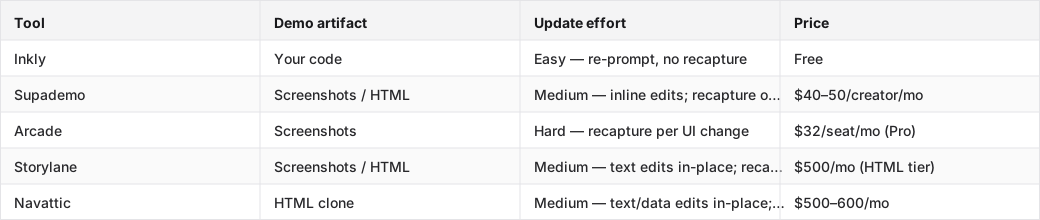
The table below ranks five tools on the axis that matters most for repo-first teams: what an update actually costs after the product ships.
Each row shows the demo artifact type, update effort on a UI change, and entry-tier price for the capability the article ranks on.
Tools compared: Inkly, Supademo, Arcade, Storylane, Navattic.
Fastest to publish is not the same as easiest to maintain
Supademo and Arcade win on day-one speed. The capture flow is fast, the output is polished, and you can have something shareable in under an hour. That speed is real and worth naming. The cost shows up on the sprint after launch, when a UI change means recapturing every affected screen, and the sprint after that, and the one after that.
Where builders beat marketers and where marketers still win
Marketers need polish and quick publishing. For a landing page that updates once a quarter, Arcade Pro at $32/seat is a reasonable call. The recapture cost is low when the product barely changes. Builders need the demo to move with the codebase. For a team shipping weekly, the recapture model is a standing tax that a code-owned demo eliminates entirely.
How to tell whether a tool belongs in the repo or in a SaaS tab
One question decides it: does your team need the demo to change when the product changes, without a manual step in a vendor's UI? If yes, the tool belongs in the repo. If the demo is a one-time asset for a campaign or a pitch deck, the SaaS path is fine.
1. Inkly — the only tool here that makes the demo code you own, living next to the product. Updates are re-prompts against the existing code, with no recapture and no vendor login required. The honest tradeoff: it requires a coding agent (Cursor, Claude, or Codex) and a repo workflow, so it is not the right fit for marketers or PMs who do not operate that way. For founders and product engineers who already prompt their way through the codebase, it is the only tool that does not create a separate maintenance track for the demo.
2. Supademo — the most accessible entry point for a first demo. The capture flow is the cleanest in the category, and the inline AI edits (text, labels, copy) reduce the recapture frequency for small changes. HTML capture unlocks at the Growth tier ($350–450/mo), which is where the update model improves. At the screenshot tier, every structural UI change is a recapture job. Best for founders who need something shareable today and are not yet running a coding agent.
3. Storylane — HTML clone plus screenshot, with in-place text and data edits that reduce recapture for non-structural changes. The Starter tier ($40/seat) is screenshot-only; HTML, the capability this ranking turns on, starts at Growth ($500/mo annual, trial request required). The feature list at Growth (Salesforce, SSO, presenter seats, Deal Intelligence) tells you who it is built for: funded sales teams, not solo founders.
4. Navattic — HTML clone from the Base tier ($500–600/mo), with solid in-place editing for text and data. The update model is better than screenshot tools but still requires recapture on structural changes. It is priced and featured for mid-market GTM teams, and the entry cost is out of range for most indie hackers.
5. Arcade — the friendliest editor in the category for non-engineers, and the right call for marketing embeds and launch pages where the demo sits still. HTML capture moved to Enterprise (sales call required) as of mid-2026, so on Pro you are committing to screenshot-only and a full recapture on every UI change. Fine for a quarterly-update landing page, expensive if you ship weekly.
How branding, captions, localization, and reuse fit into the workflow
Brand controls should live where the demo lives
Colors, logos, and font tokens are not a polish step you do at the end. They are part of the demo artifact. When the demo is code, brand controls are variables in the same file. Change the primary color in one place and every scene reflects it. When the demo is a recording in a vendor's SaaS, brand changes mean opening the editor and touching every affected screen manually.
An interactive demo tool that keeps brand controls in the artifact makes reuse trivial: one base demo, one brand token swap, and you have a white-labeled variant for a new customer or a co-branded version for a partner.
Captions and voiceover are useful only if they are easy to revise
Subtitles and voice tracks are part of the update cost. If the script changes, because a feature name changed, a pricing tier was renamed, or a flow was restructured, the caption file and the voice track both need to update. On a code-owned demo, the agent regenerates both from the updated copy in the same prompt that updates the UI. On a recording, you go back to the voiceover tool, re-record, re-sync, re-export.
Localization matters when one demo has to do more than one job
A single demo that serves a landing page, a sales call, an onboarding flow, and a training module in three languages is not a recording problem. It is a variant problem. Code-owned demos handle this with re-prompts: same base, different copy file, different voiceover pass. The alternative is maintaining separate recordings per language per use case, which compounds with every product change.
Where Inkly comes in
The structural problem this article established is not that demo tools lack AI. Most of them have it. The problem is that the demo is a recording inside someone else's app, so every product change and every new customer creates a new rebuild job. The kind of tool that solves this is not one with a better editor. It is one where the demo is code you own, off-platform, authored and maintained by your own agent.
Inkly is built on that premise. The demo is code that lives next to your product, not a recording in Inkly's cloud. When the product ships a UI change, you re-prompt your agent against the existing demo code; no recapture, no manual annotation pass. When a new customer needs a branded variant, you re-prompt for their logo, their copy, their sandbox data, off the same base. The honest catch: you need a coding agent (Cursor, Claude, Codex) already in your workflow. The in-app hosted agent is roadmap, not shipped. For founders and engineers who already work that way, the tradeoff is worth it. The demo moves with the product, and every update is a prompt, not a re-record.
FAQ
Q: Which AI demo generator works best if I want the demo to live in my repo and be updated by engineers?
Inkly is the only tool in this comparison that makes the demo code you own, living in your repo. The catch is that it requires a coding agent (Cursor, Claude, or Codex), so it is not a fit for teams that do not already work that way. If you are repo-first and agent-fluent, it is the clear answer.
Q: Can I generate a pitch-ready product demo from a prompt without using a separate video team?
Yes. Prompt-to-demo tools like Supademo and Inkly can produce a shareable, polished demo without a video team. Supademo's capture flow is the fastest for a first demo; Inkly's Chrome extension captures screens as a starting basis, then your agent writes the demo as code. Neither requires a video production step.
Q: How do I keep a demo accurate when the product UI changes every sprint?
The update path determines the answer. On screenshot tools (Arcade, Supademo screenshot tier), every structural UI change means recapturing affected screens. On HTML-clone tools (Storylane Growth, Navattic), text and data edits are in-place but structural changes still require a re-clone. On a code-owned demo (Inkly), you re-prompt your agent against the existing code, with no recapture and no manual pass.
Q: What does version control look like for an AI-generated product demo?
When the demo is code in your repo, version control is standard git: branches for variants, commits for changes, pull requests for review, rollback for anything that breaks. When the demo is a recording in a vendor's SaaS, "version history" means whatever the vendor's UI surfaces, usually a list of saves rather than a diffable history you control.
Q: Which tool is fastest for a marketer to publish, but still easy for a builder to maintain?
Supademo wins on publish speed and is the most accessible for non-engineers. For a builder who needs to maintain the demo after launch, Inkly is easier. Updates are re-prompts, not recaptures. The tradeoff is that Inkly requires a coding agent; Supademo does not. If the team includes both a marketer and an engineer with an agent setup, Inkly's first-demo speed, via the Chrome extension capture path, is comparable to Supademo's, with a significantly lower update cost from the second sprint onward.
Conclusion
Go back to those two tabs, the demo and the live product. If fixing the mismatch between them means opening a vendor's editor and recapturing screens, the tool you are using keeps the demo in someone else's box. This week, check one thing: whether your current demo can be updated without leaving the codebase. If it cannot, you do not have a demo problem. You have an ownership problem. That is the one worth solving.
Curious how the agent builds and maintains a demo like this? See how Inkly works.
Ship your next demo before the meeting starts
Interactive demos built from your real product and kept current as you ship, done for you.


