Reprise alternatives: Repo-native options builders can maintain
Compare Reprise alternatives through a repo-native lens: what lives in your repo, how updates work, what each tool costs, and which fit builders, GTM teams, and

Every demo tool gives you the same honeymoon. You capture a flow, it looks good, you send it, a prospect clicks through. Then you ship. Then you ship again. Three releases later the demo shows a nav that moved and a modal that no longer exists. That is when the real question shows up, and most comparisons of reprise alternatives skip right past it: where does the demo actually live after you ship?
If the answer is "inside the vendor's SaaS," you're renting the artifact. Every update means a re-record or a hand edit in someone else's editor. If the answer is "in your repo, next to the product code," a prompt to your agent is enough to bring it current. That split, vendor SaaS versus your repo, is the part that matters here.
The tools below are ranked by ownership first, then by price, setup time, and GTM fit. The table gives you the quick scan; the ranked list explains why.
Why Reprise alternatives should be judged by where the demo lives
Reprise is built for enterprise GTM teams: guided tours, live overlays, sandbox environments, and a sales ops workflow that routes demo activity into CRM. That's a real product for a real buyer. It is also priced and packaged for funded sales teams, not for a founder, indie hacker, or product engineer who needs a demo that changes with the product every sprint.
The first-demo honeymoon
The capture works fine. You record the flow, annotate the steps, send the link. The demo looks shipped. The problem is the artifact: it is a recording of your product at a specific moment, stored inside the vendor's platform. The moment you push a UI change, a renamed sidebar item, a restructured onboarding screen, a new pricing modal, the recording shows the old version. Every affected screen needs another capture pass. That work grows with how often you ship.
Vendor SaaS versus your repo
The ownership split is simple. On a hosted SaaS tool (Supademo, Arcade, Storylane, Navattic, Reprise), the demo is an artifact inside the vendor's platform. You edit it through their UI. You cannot branch it in Git, compare it to last week's version, or hand it to Cursor with a prompt. On a code-owned tool, the demo is HTML and code that lives in your repo, next to the product. When the product ships, you re-prompt your agent against the existing demo code. No re-record. No manual click-by-click fix. The Mintlify docs model is the right mental model: their platform, your code, your agent maintains it.
The table below shows where each tool lands on demo artifact, update effort, and price at the lowest self-serve tier.
Tools compared: Inkly, Supademo, Arcade, Storylane, Navattic.
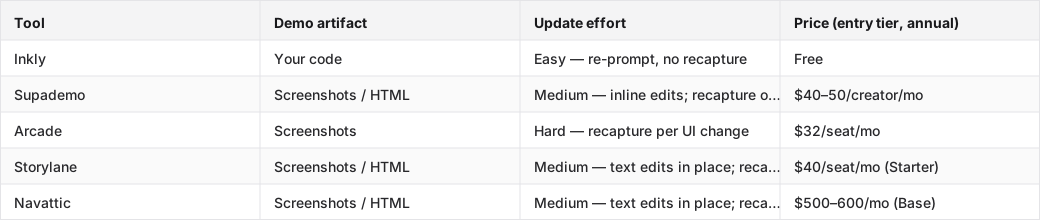
Compare Reprise alternatives by creation, versioning, and update flow
How the creation flow differs
On a hosted tool, creation is a browser extension capture: click through the product, annotate the steps, publish. Fast for demo one. On a code-owned tool like Inkly, you either capture screens the same way through the Chrome extension, or you describe the demo to your agent and it writes the HTML from scratch. Both paths land a shareable demo quickly. The difference shows up on demo two, when the product has changed.
What versioning looks like when the product branches
On a SaaS-locked tool, there is no branching. You have one demo, or a handful of manually duplicated variants, each stored in the vendor's platform. Sales wants a version with customer A's logo; marketing wants a version with the new hero flow; the product shipped a new feature that's not in either. You manage this by hand, inside the vendor's editor, with no diff and no rollback. On a code-owned tool, the demo is a file in your repo. You branch it the same way you branch the product — `git checkout -b customer-acme-variant`, re-prompt for the logo and copy swap, commit. Version history is Git history. PostHog's engineering blog documents this pattern for docs; it applies equally to demos.
What breaks when the UI changes next sprint
Push a UI change on a branch and try to refresh the demo. Screenshot tools need a fresh capture pass per affected screen. There is no in-place layout edit, because the demo is a PNG, not a DOM. HTML-clone tools (Supademo's Growth tier, Storylane's Growth tier, Navattic's Base tier) handle text and data swaps in place, but structural changes, a nav restructure, a new modal, a reordered sidebar, still require a re-clone of the affected screens. Code-owned tools re-render from the new code through a single agent prompt: describe what changed, the agent rewrites the relevant sections of the demo code, done. To check this on your own product this week, pick one UI change from your last sprint and count the steps each model takes to reflect it in the demo. The answer tells you which tool you're actually buying.
Pick the Reprise alternative by demo format, not brand name
HTML demos when the product changes often
If your product ships weekly, the demo format that lowers the cost of change is HTML or code-native, not a screenshot. HTML-clone tools capture the live DOM, which means text and data edits do not require a re-record. The catch: on most tools, HTML capture is gated to a paid tier priced for GTM teams, not solo founders. Supademo's HTML tier starts around $350–450/mo. Storylane's HTML (Growth) starts at $500/mo. Arcade moved HTML to Enterprise only in 2026. Inkly is free, and HTML demos are available from the only tier there is, with no gate. For interactive demo software that has to stay current across weekly releases, that pricing gap is the real decision.
Screenshot tours when speed matters more than ownership
Screenshot-based tools, Arcade Pro at $32/seat, Supademo's entry tiers, Storylane Starter at $40/seat, are the fastest path to something shareable. If your product is stable, your demo is a one-time sales asset, or you're a marketing team that updates the demo once a quarter, screenshot tools are fine. The ownership tradeoff is real but manageable at low update frequency. The problem is that "low update frequency" rarely survives contact with a real product roadmap.
Sandbox and live demo flows for sales-led teams
Reprise's core product, and Navattic's and Walnut's, is the sandbox or live-overlay demo: a safe, explorable clone of the real product that a sales rep walks a prospect through live. That format answers a different job than repo-owned builder workflows. If your GTM motion is sales-led, with an SDR routing qualified prospects to a live demo with a rep, Navattic or Reprise is the right category. If your GTM motion is product-led, a prospect clicks a link, explores on their own, and the demo has to stay current without a human in the loop, the ownership question comes back to the center.
Read pricing and setup time as part of the same decision
Which tools self-serve and which need a sales call
Reprise is sales-assisted: no public pricing, no self-serve trial. Navattic's Base tier ($500–600/mo) requires a trial request. Arcade's HTML tier is Enterprise only, which means a sales call. Supademo, Storylane Starter, Arcade Pro, and Inkly are all self-serve. For a lean team that needs to move this week, the self-serve shortlist is Inkly (free), Arcade Pro ($32/seat), Storylane Starter ($40/seat), and Supademo entry tiers ($40–50/creator). That's the real competitive set for a Reprise competitor that a solo founder or small team would actually buy.
The cheapest tier is not always the cheapest path
Storylane Starter at $40/seat looks affordable. But Starter is screenshot-only. If the article's axis is HTML maintenance, and for a team shipping weekly, it is, the relevant Storylane tier is Growth at $500/mo. That is a $460/mo gap between the headline price and the price that delivers the capability. The same pattern holds for Arcade, where Pro is screenshot-only and HTML is Enterprise, and Supademo, where screenshot tiers are affordable but HTML starts higher. A Reprise competitor comparison that anchors on headline price without naming the tier that actually unlocks the capability is misleading.
Where startup and RevOps budgets actually diverge
A RevOps team at a funded SaaS company can absorb $500/mo for Storylane Growth or Navattic Base, especially if the alternative is a sales rep re-recording demos by hand before every call. A solo founder or indie hacker cannot. The feature list at Storylane Growth, Salesforce integration, SSO, presenter seats, Deal Intelligence, tells you who it is built for: funded sales teams. For a builder who wants a demo that lives in Git and updates with a prompt, the right budget tier is free, and the right tool is the one where free means HTML, not screenshots.
Match the Reprise alternative to the team that has to live with it
Builder teams that want the demo in Git
If you're a founder, indie hacker, or product engineer already working with Cursor, Claude, or Codex, the repo-native path is the obvious fit. The demo is code you own, it lives next to the product, and your agent maintains it. Inkly is the only tool in this comparison built on that premise. The honest tradeoff: bring-your-own-agent is the MVP path. The hosted in-app agent is roadmap, not shipped. If you do not already have Cursor or Claude set up, there is a setup step before the first demo. That is the real cost, not the price.
GTM teams that need CRM and martech flow
If the demo has to route activity into Salesforce, HubSpot, or Marketo, and if the team running it is sales ops or marketing ops, not a product engineer, Storylane, Navattic, or Reprise are the right tools. Storylane Growth includes Salesforce integration and Deal Intelligence. Navattic's Base tier includes CRM routing and analytics. These tools are built for the workflow where a demo is a sales asset managed by a GTM team, not a product artifact managed by an engineer. The integrations that matter are Salesforce, HubSpot, Marketo, Slack for routing, and SSO for team permissions. Inkly's analytics, views and visitors, are MVP-level; it is not the right tool for a RevOps team that needs demo activity in a CRM today.
The honest tradeoff for teams without a demo engineer
Some tools are wrong fits regardless of how good they look in a comparison table. If the team does not think in code and does not have a coding agent set up, Inkly's bring-your-own-agent path is extra friction. Supademo's all-in-platform flow is the cleaner first step. If the team is a solo PM at a Series A company with a GTM motion and a Salesforce instance, Storylane or Navattic are the right tools even though they are more expensive. The question is not which tool is best in the abstract. It is which tool the team that has to maintain it can actually operate.
Where Inkly comes in
The structural problem this comparison keeps returning to is the same one: every hosted demo tool makes the demo an artifact inside its platform, so every UI change, every new customer, every variant request costs rework in its editor. The tool that solves this is not a better editor. It is a tool where the demo is code you own, off-platform, that your agent can re-author from a prompt.
Inkly is built on that premise. Capture screens through the Chrome extension the same way you would on Supademo, or describe the demo to your agent and it writes the HTML from scratch. Either way, the output is code that lives in your repo. When the product ships a UI change, you re-prompt against the existing code, no re-record, no manual click-by-click fix. When a new customer wants a branded variant, you re-prompt for their logo, copy, and sandbox data off the same base. The honest tradeoff: you need a coding agent (Cursor, Claude, Codex) already in your workflow. If you do not, the hosted SaaS tools are the faster starting point. If you do, vibe-coding a new demo takes minutes, and staying current costs a prompt, not an afternoon.
FAQ
Q: Which Reprise alternative is best if we want to own demo assets in a repository and update them like code?
Inkly is the only tool in this comparison where the demo is code you own, HTML that lives in your repo and is maintained by your coding agent (Cursor, Claude, Codex). Every other tool keeps the demo inside the vendor's platform. If you want to branch the demo in Git, compare it to last week's version, or re-prompt your agent to reflect a UI change, Inkly is the answer. Teams without a coding agent already in their workflow should start with Supademo or Storylane and migrate when they are ready.
Q: How do the leading alternatives differ in setup time, ongoing maintenance, and demo update workflow?
Setup: Arcade, Supademo, and Storylane Starter are all self-serve in under an hour; Navattic and Reprise require a trial request or sales call. Maintenance: screenshot tools (Arcade Pro, Storylane Starter) require a full recapture per changed screen; HTML-clone tools (Supademo Growth, Storylane Growth, Navattic Base) handle text and data edits in place but still re-clone on structural UI changes; Inkly re-prompts the agent against existing code, with no recapture at any level. Update workflow: the bigger the shipping cadence, the more the recapture cost compounds on screenshot and HTML-clone tools.
Q: Which tool gives the best value for a startup or RevOps team on a tight budget?
For a startup founder or indie hacker: Inkly is free and includes HTML demos with no tier gate. For a RevOps team that needs CRM integration, the honest entry price is Storylane Growth at $500/mo or Navattic Base at $500–600/mo, both of which require trial requests. The cheap headline tiers, Storylane Starter at $40/seat and Arcade Pro at $32/seat, are screenshot-only, so if HTML maintenance is the goal, the real cost is higher than the headline.
Q: Which alternative is best for marketing-led HTML demos versus sales-led live demos versus sandbox demos?
Marketing-led HTML demos: Supademo Growth or Inkly, depending on whether the team works in a repo. Sales-led live demos with a rep in the loop: Storylane Growth or Navattic Base, both of which include presenter seats and CRM routing. Sandbox and live-overlay demos for enterprise GTM: Navattic or Reprise. The wrong fit is using a sandbox tool (Reprise, Navattic) when the job is a self-serve marketing asset, or using a screenshot tool (Arcade Pro) when the job is an HTML demo that has to survive weekly releases.
Q: Do any of these tools reduce demo maintenance when the product UI changes every sprint?
Yes, but the mechanism matters. HTML-clone tools (Supademo Growth, Storylane Growth, Navattic) reduce maintenance on text and data changes. You edit in place without recapturing. They do not reduce it on structural UI changes, such as nav restructures, new modals, or reordered sidebars, which still require a re-clone. Code-owned tools (Inkly) reduce maintenance on all types of changes, structural or not, because the demo is code the agent re-authors from a prompt, not a recording of a specific UI state. Check this on your own product: take one structural UI change from your last sprint and count the steps each model requires to reflect it.
Conclusion
The ownership question from the start of this comparison is also the close: if the demo has to change with the product, the right tool is the one that keeps the asset in your control. Vendor SaaS tools are fine for demo one. They get expensive, in time more than dollars, the moment you ship weekly and need the demo to keep up. Run the branch-and-update test on your current demo this week. Pick one UI change from your last sprint, try to reflect it in the demo, and count the steps. That number tells you more than any comparison table can.
Ship your next demo before the meeting starts
Interactive demos built from your real product and kept current as you ship, done for you.


