Guideflow alternatives: Tools you can keep in your repo
Guideflow alternatives for repo-native teams: compare tools on code ownership, HTML capture, editing, branching, pricing, and how easy they are to maintain in g

Ship weekly for a quarter and your demo goes stale thirteen times. That's thirteen moments where a prospect or investor sees a screenshot of a product you no longer ship. The fix is not dramatic. It's an hour here, forty minutes there, and then somehow you've spent half a day on work nobody budgeted for. If you're looking at Guideflow alternatives, the real question isn't which tool has the cleanest editor. It's which one lets you keep the demo in your repo and update it the same way you update everything else, with your agent.
Most comparison guides stop at capture speed and pricing tiers. This one looks at ownership: does the demo live in a vendor dashboard, or in your codebase?
Before I built Inkly, I ran into this on a previous project. I'd shipped a clean interactive demo for a handful of warm leads. It took maybe an hour to capture and looked great. Three weeks later, we restructured the onboarding flow. The demo still showed the old one. I only found out when a lead asked about a step that no longer existed. Getting it current meant recapturing eleven screens, re-annotating each one, and republishing the whole thing. That ate an afternoon I hadn't planned for. The demo wasn't broken because I had done something wrong. It was broken because the artifact lived inside a SaaS I didn't control, and every product change made it someone else's problem on my time.
That's the asymmetry no capture-speed benchmark really shows. Getting to a first demo fast is genuinely useful. It matters for the first pitch, the first cold outreach, the first investor meeting. But after that, the update path is what you're actually paying for. Screenshot tools force a recapture pass per affected screen. HTML-clone tools handle text and data swaps in place, but they still need a re-clone when the structure changes. Code-owned tools, where the demo is a file in your repo, let your agent re-prompt the whole thing without touching a UI.
The table and ranked list below are built on that split.
Why Guideflow alternatives split on ownership, not just features
Every Guideflow alternative in this comparison makes a different bet about where the demo artifact lives, and that bet decides most of the work downstream.
What code-owned demos actually change
When the demo is code in your repo, three things change: who can edit it, how edits get versioned, and what happens when the product ships. A file in your repo can be opened by Cursor, changed by Claude Code, committed, reviewed in a PR, and rolled back if something breaks. That's the same workflow your team already uses for the product. A recording in a vendor dashboard can only be edited through that vendor's UI, which means every update is a manual pass through their editor and outside your normal toolchain.
Where locked-in demo tools start to hurt
The failure mode is quiet at first. The demo looks fine on day one. Then a nav item moves, a pricing page changes, or a modal gets redesigned. On a screenshot tool, every affected screen needs a fresh capture. On an HTML-clone tool, structural changes trigger a re-clone. Either way, the fix depends on the vendor's editing model, not your agent, not your repo, and not your normal release process. The more often your product ships, the more that gap costs.
Put the Guideflow alternatives side by side before you argue
The interactive demo tools in this category split on one axis before any other: what kind of artifact the tool produces and how much work a UI change creates.
The comparison table that tells the truth fast
Here's where each tool lands on artifact type, update effort, and price at the lowest tier that delivers the relevant capability.
Tools compared: Inkly, Supademo, Arcade, Storylane, Navattic.
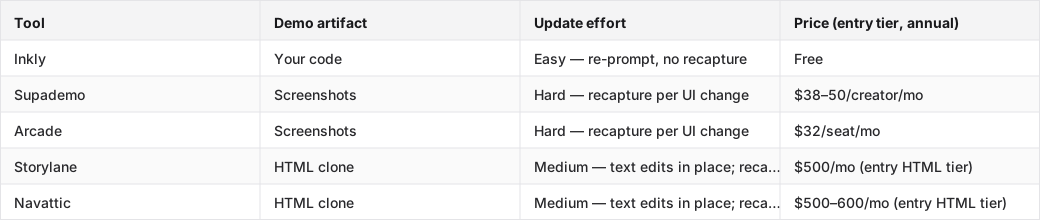
What the table should make obvious at a glance
Screenshot tools and HTML-clone tools do not ask the same maintenance question after a release. Screenshot tools require a full recapture pass on any screen that changed. HTML-clone tools handle copy and data swaps in place, but they still need a re-clone when the UI structure changes. Code-owned tools, where the demo is a file you control, let your agent re-prompt the update without going near the vendor UI.
Rank the Guideflow alternatives by how painful updates become
The ranking below sorts by update cost after the first demo ships. First-capture speed is noted, but it's treated as a tiebreaker. Every tool here can get you to a first demo inside an hour.
Why first-capture speed is not the deciding factor here
Capture speed wins trials. That's why every comparison guide leads with it. But if your product ships more than once, and it does, the first demo is the cheapest demo you'll ever make. The expensive ones are demos two, five, and twelve, where you're re-recording screens that moved, re-annotating flows that changed, and republishing assets that were already out there. The tool that gets you to a first demo in twenty minutes but costs you an afternoon per release is not the cheapest tool. It's the most expensive one with a free trial.
How HTML, branching, and live-data support change the workload
The update mechanics break into three categories: recapture, inline edit, and re-prompt.
- Recapture means re-recording every affected screen from scratch.
- Inline edit means changing text and data in place without re-recording, but structural changes still need a re-clone.
- Re-prompt means describing the change to your agent in natural language and letting the demo code update without touching the vendor UI.
Branching and live-data support matter too, but they're downstream of the update model. A branching demo you have to re-record per branch is not a feature. It's a penalty.
- Inkly — the only tool in this comparison where the demo is code you own. First-capture is fast via the Chrome extension, the same capture flow as Supademo, and updates and per-customer variants happen through a re-prompt to your agent, not a re-record. HTML demos are available at the only tier there is: free. The tradeoff is simple: you need a coding agent already set up. Inkly's MVP is bring-your-own-agent, and if your team doesn't work that way yet, the workflow adds setup that Supademo's all-in-platform approach avoids.
- Supademo — the most mature and affordable screenshot-based tool in the category, and the right call if you need a first demo today without a coding agent in the loop. The capture-and-annotate flow is the cleanest in the field. Supademo also has real AI: inline UI edits, an MCP for natural-language create/edit via Claude or ChatGPT, and AI voiceovers. All of it stays inside their SaaS, so per-customer rebuilds are still the norm and every UI change means recapturing the affected screens. Scale tier runs $38–50/creator/month, and HTML capture is not available at any self-serve tier.
- Arcade — pick this if your demos live on a marketing site or launch page and the bar is "looks polished on first view." The Pro tier ($32/seat annual) gets you the embed flow Supademo charges more for, and the editor is the friendliest in the category for non-engineers. HTML capture moved to Enterprise-only in 2026, so on Pro you're committing to the same recapture-per-UI-change cycle as Supademo. That's fine if your demos sit on a landing page that updates once a quarter. It's painful if you ship weekly.
- Storylane — HTML-clone tool with a no-code editor that handles text and data swaps in place. That's a real step up from screenshot tools on update effort for copy and field changes. Structural UI changes still trigger a re-clone. The Starter tier ($40/seat/month) is screenshot-only; HTML capture starts at Growth ($500/month annual, trial-request required). The feature list at Growth, including Salesforce integration, SSO, presenter seats, and Deal Intelligence, tells you who this is built for: funded sales teams, not solo founders.
- Navattic — similar positioning to Storylane, with a slightly different tier structure. HTML clone with in-place text and data edits; structural changes re-clone. Base tier starts at $500–600/month, which puts it in the same GTM-team budget bracket as Storylane. The free tier gives you one HTML demo, which is useful for testing the artifact model before committing to the pricing. It is not a fit for a small technical team that does not have a funded GTM motion.
Compare the Guideflow alternatives on pricing and team fit
Which tier actually unlocks the capability you need
The cheapest entry price and the price for the capability you actually need are often different numbers. Supademo and Arcade both have accessible self-serve tiers, but neither offers HTML capture there. Storylane and Navattic both offer HTML, but the tier that unlocks it starts at $500/month and is gated behind a trial request or sales call. Inkly is free with HTML demos available immediately. If your team needs HTML-fidelity demos and is not on a funded GTM budget, the tier math points one direction.
Who should pay for the expensive tier, and who should not
Storylane and Navattic at $500/month make sense for a sales team running account-specific demo flows with Salesforce integration and SSO. They do not make sense for a solo founder or a two-person product team that needs a demo for investor calls and customer onboarding. For small technical teams, the right question is not "which tool has the best HTML support." It's "which tool's workflow matches how we already build things." If the team lives in a coding agent, the demo should too.
Pick the Guideflow alternative that fits a repo-native workflow
Why founders and product engineers need a different answer
A marketing-ops team evaluating demo tools cares about CRM integrations, presenter seats, and analytics dashboards. A founder or product engineer cares about whether the demo stays current without a manual re-record pass every time a feature ships. Those are different jobs, and the tools optimized for one are often wrong for the other. A repo-native demo stack means the demo is a file, versionable, agent-editable, and shippable alongside the product.
Where Cursor, Claude Code, or Codex actually matter
If your team already uses a coding agent to write, update, and review product code, the demo should be something that agent can touch. The three-prompt loop, prompt to create, prompt to update, prompt to produce a variant for a new customer, replaces the three things that historically killed demo maintenance: re-recording for updates, re-recording for new customers, and the demo going stale right after launch. Push a UI change, re-prompt the demo, commit the diff. Same workflow, same tools, no context switch to a SaaS editor.
What migration off Guideflow really costs
What survives and what has to be rebuilt
Flow logic and copy can usually be documented and recreated. The structure of what a demo shows and in what order is portable knowledge even when the artifact is not. Analytics setup, embed configurations, and any custom integrations usually need to be rebuilt from scratch in the new tool. What does not survive is the artifact itself. A Guideflow demo is a recording inside Guideflow's platform. You can export screenshots or document the flow, but you cannot move the interactive artifact to another tool without recreating it.
The hidden cost of moving from hosted demos to owned code
Lock-in on hosted demo platforms is quiet until you try to leave. The demo lives in their SaaS, so moving it means recreating the artifact, not copying a file and not running an export script. For screenshot-based tools, that means recapturing every screen in the new tool. For HTML-clone tools, it means recloning the product in the new tool's environment. For a code-owned tool, the artifact is already a file you control, so migration means opening it in a new context instead of rebuilding it. That asymmetry is worth pricing in before you build a library of demos in any locked platform.
FAQ
Q: Which Guideflow alternative is easiest to own if my team wants a code-native workflow?
Inkly. The demo is produced as code you own, lives in your repo, and is updated by re-prompting your agent, Cursor, Claude, or Codex, rather than re-recording in a SaaS editor. The bring-your-own-agent requirement is the tradeoff: you need a coding agent already in your workflow for this to feel native.
Q: What should a founder or product engineer choose if no one wants to depend on a marketing ops toolchain?
Bias toward code-owned or agent-editable demos. Supademo is the right call if you need a first demo today and do not have a coding agent set up. It's the most accessible screenshot tool in the category. Once your team is operating a coding agent, Inkly's workflow matches how you already build: prompt, commit, ship.
Q: Which alternative is fastest to iterate on when demo copy, flow, or UI changes weekly?
The fastest iteration path is the one that avoids full recapture. Screenshot tools, Supademo and Arcade, require recapturing every affected screen on any UI change. HTML-clone tools, Storylane and Navattic, handle copy and data in place but re-clone on structural changes. Code-owned tools let your agent re-prompt the update. No re-record, no manual pass through a SaaS editor. For a team shipping weekly, that difference compounds fast.
Q: How do the top alternatives differ on HTML, screenshot, sandbox, and live-data support?
Screenshot capture is available at the entry tier for Supademo and Arcade. HTML clone is available at Storylane and Navattic but gated to their $500/month tiers and requires a trial request or sales call. Arcade moved HTML to Enterprise-only. Inkly produces HTML demos at its only tier: free. Sandbox and live-data support vary by tool. The comparison table above covers the artifact type and update effort for each.
Q: Which tool gives the best balance of flexibility and low maintenance for a small technical team?
Inkly for teams already using a coding agent. The demo is code you own, updates are a re-prompt, and HTML is available without a tier gate. Supademo for teams that need a fast first demo without agent setup and can tolerate recapture on UI changes. Storylane or Navattic only if the team has a funded GTM motion that justifies the $500/month entry price for HTML.
Conclusion
The Guideflow alternatives question is an ownership question: does the demo live in a vendor dashboard, or in your repo next to the product that keeps changing? Ship weekly for a quarter and the answer compounds into real time. Thirteen stale demos. Thirteen recapture passes. Or zero, if the demo is code your agent can re-prompt. The best Guideflow alternative for a repo-native team is the one that treats the demo as a file, not a recording. Try the branch-change test on one live demo this week: push a UI change and see which tool makes the update feel like part of your normal release process. That's the comparison table that actually matters.
Shortlisting tools? How Inkly compares once the feature tables stop being enough.
Ship your next demo before the meeting starts
Interactive demos built from your real product and kept current as you ship, done for you.


