Tourial alternatives: Pick by workflow, not brand
Compare Tourial alternatives by workflow, maintenance burden, analytics, embeds, and procurement fit so you can choose the tool that won’t break after your next

Open the last Tourial demo you shipped. Now open your live product in a second tab. Look for the mismatch: a nav item that moved, a flow that changed, a modal that no longer exists. If you find one in under thirty seconds, that gap is the real question this article answers: which Tourial alternatives fit marketing demos, sales sandbox demos, or a code first workflow, and which ones make the mismatch worse. The right Tourial replacement depends on which of those three jobs you're actually hiring it to do.
What kind of Tourial replacement do you actually need?
Most buyers open a comparison list and start filtering on price or brand familiarity. That's the wrong starting point, because Tourial alternatives split into three different categories, and a tool that wins one job usually loses the other two.
The three jobs buyers keep mixing up
Marketing demos live on landing pages, run in email campaigns, and need to look sharp on first contact. Speed of creation and embed flexibility matter more than deep analytics or guided selling.
Sales sandbox platforms let reps tailor a live product environment to a specific account. They trade first-impression polish for guided selling depth, buyer qualification, and CRM signal.
Code-owned workflows treat the demo as code in your repo, updated the same way the product is updated, by prompting an agent against the existing demo code rather than re-recording a screen.
One tool rarely wins all three. Tourial was built for the sales sandbox and demo center use case, which is why buyers switching to a marketing-first or code-first workflow often find it over-engineered for their actual job.
What changes when the demo has to survive a release
The real test isn't how fast you build the first demo. It's what happens the week after you ship a UI change.
Screenshot-based tools require recapture on every affected screen. There's no in-place layout edit. HTML-clone tools handle text and data swaps in place but re-clone on structural changes. Code-owned tools re-render from the current product code via an agent prompt, so the update cost is a sentence, not a session. According to PostHog's writing on internal tooling, the artifact that lives closest to the source of truth is the one that ages best. The same logic applies to demos.
Tourial alternatives split into marketing demos, sandboxes, and code-owned workflows
Here's how the field maps to those three jobs, using interactive demo tools across the category.
The table below shows where each alternative lands on update effort, entry price, and demo artifact type.
Tools compared: Inkly, Supademo, Arcade, Storylane, Navattic.
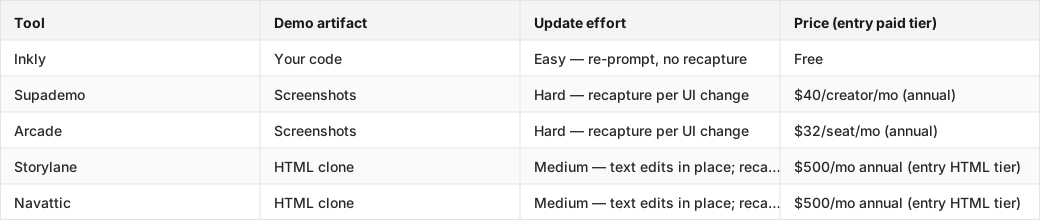
Marketing demo tools are built for reach, not deep maintenance
Supademo and Arcade are the natural Tourial alternatives when the job is a polished embed on a landing page or a product walkthrough in an email sequence. Both have fast capture flows, clean embed options, and approval cycles that don't require engineering. The tradeoff shows up the first time you ship a UI change: every affected screen needs a fresh capture pass. For a demo that lives on a marketing page and updates once a quarter, that's manageable. For a team shipping weekly, it gets old fast.
Arcade's Pro tier ($32/seat/month, annual) is slightly cheaper than Supademo's entry tier and has the friendliest editor for non-engineers. HTML capture on Arcade moved to Enterprise-only as of 2026, so on self-serve you're committing to the screenshot model.
Sales sandbox platforms trade polish for guided selling
Tourial's natural peers, Walnut and similar sales enablement tools, sit in this bucket. They're built for reps who need to tailor a product environment per account, track buyer engagement, and route intent signals to CRM. Setup is heavier, procurement usually involves a sales call, and the entry price reflects a team-seat model rather than a solo-founder path.
If you're replacing Tourial because the sales sandbox overhead is too much, this category isn't the answer. If you're replacing it because the specific platform didn't fit your CRM or rep workflow, evaluate Walnut on those axes directly.
Code-owned workflows are for teams that ship through a repo
When the buyer's team already uses Cursor, Claude Code, or Codex, the better comparison isn't Tourial versus another SaaS demo tool. It's Tourial versus a workflow where the demo is code that lives next to the product. Prompt to create, prompt to update, prompt to produce a variant for the next customer. No re-record, no editor session, no artifact locked in someone else's platform. For teams that ship often, this is the only model where update cost doesn't grow with release cadence.
The buyer matrix: maintenance, analytics, embeds, and procurement
The table above is the at-a-glance scan. The real Tourial replacement decision turns on five axes: operating model, implementation complexity, analytics depth, embed flexibility, and maintenance burden. Here's how to use them without getting distracted by first-run polish.
How to read the matrix without getting seduced by first-run polish
Every tool in this category looks good in a trial. The demo you build on day one is always the cleanest it will ever be. The axis that separates tools is what happens on day thirty, after two UI changes and a pricing page restructure.
Run this test before you commit: push a real UI change on a branch, then try to update the demo. Screenshot tools need a fresh capture per affected screen. HTML-clone tools handle text swaps in place but re-clone on structural changes. Code-native tools re-render from the new code via a prompt. The test takes twenty minutes and tells you more than any trial period.
Why the cheapest plan is not the cheapest tool
Storylane's Starter tier is $40/seat/month, but HTML capture, the capability that makes the demo maintainable at scale, starts at Growth ($500/month, annual, trial request required). Navattic's HTML demos start at a similar threshold. Arcade's HTML capability is Enterprise-only. If your Tourial replacement evaluation is anchored to the headline entry price, you may be comparing the wrong tier to the right capability.
SSO, audit logs, and CRM sync, the features a RevOps team needs before a demo tool can go to production, typically sit behind the same enterprise tier that unlocks HTML. Factor that into the real cost before the pilot starts.
Pick the Tourial alternative that fits your team shape
RevOps teams need governance before they need glow
The tools that win RevOps evaluations are the ones that can answer procurement questions before the pilot ends: SSO available? Audit logs? Admin roles? CRM sync to Salesforce or HubSpot? Storylane and Navattic are the two tools in this category with the deepest GTM-team feature sets: seat-based pricing, Deal Intelligence, presenter controls. The price reflects that positioning: $500/month and up, annual commitment, sales-assisted onboarding. If governance and measurability are the brief, those are the honest shortlist.
Demand gen needs embeds that do not turn into busywork
For demand gen, the right Tourial replacement is the one that fits a landing page, runs in an email, and doesn't create a maintenance tax every time creative refreshes. Supademo and Arcade both win here: fast to build, clean embeds, approval cycles that don't touch engineering. The honest limit is that both run on the screenshot model, so a significant UI change means a recapture session. If the demo is a quarterly asset that rarely changes, that's fine. If it's tied to a campaign that iterates weekly, the maintenance cost shows up fast.
PMMs and founders need something they can actually keep current
The best fit for a small PMM team or a solo founder is the tool they can launch, update, and reuse without putting demo maintenance on a backlog. That's a different question from "which tool has the most features." It's about time to value and upkeep. Supademo's entry tier ($40/creator/month) is the fastest path to a first shareable demo in the category. The honest tradeoff: every UI change is a recapture session, and there's no HTML tier at that price.
Code-first product teams should stop shopping like marketers
If your team already lives in a coding agent, the right Tourial alternative is not another SaaS demo tool. It's a workflow where the demo is code you own, updated by prompting the agent against the existing demo code. That's a different category entirely. Evaluating it against Supademo's capture speed or Storylane's embed options is the wrong comparison. The axis that matters is: can I update this demo with a prompt, or do I have to re-record it?
What pricing, contracts, and procurement usually look like
Where self-serve ends and sales calls start
Most tools in this category have a free tier or a low-cost entry plan that covers screenshots and basic embeds. The jump to HTML capture, SSO, and CRM sync typically means a sales call and an annual contract. Storylane Growth starts at $500/month annual and requires a trial request. Navattic's HTML tier is in the same range. Arcade HTML is Enterprise-only, quote required. Supademo's Growth tier, where HTML lives, runs $350-450/month depending on seat count.
If your evaluation needs HTML fidelity and governance controls, budget for the mid-tier or enterprise tier, not the headline entry price, before the shortlist is final.
Security review is not an edge case
SSO, audit logs, admin role controls, and data residency questions come up in most RevOps and IT security reviews before a demo tool goes to production. Check vendor security pages early, not after the pilot. Tools that gate SSO to enterprise tiers can stall a procurement that started on a self-serve trial. A short pre-pilot checklist: SSO (SAML or OIDC?), audit log availability, admin vs. viewer roles, data processing agreement, contract flexibility (annual vs. multi-year).
What happens when you switch off Tourial
Migration is where most evaluations underestimate the real switching cost.
What survives and what gets rebuilt
Tourial's demo center model means most of what you built lives in their platform: embeds, routing rules, analytics history, and demo variants. When you switch, the embeds break immediately. Analytics history typically doesn't export in a format the new tool can ingest. Routing logic, which demo shows to which visitor segment, needs to be rebuilt in the new tool's framework.
What survives: the underlying product knowledge that went into building the demos. What gets rebuilt: the demos themselves, the embed placements, and any CRM routing that was wired through Tourial's integrations.
The hidden cost is usually the demo library
The hard part of a Tourial migration isn't learning the new tool. It's the demo library. If you've built twenty demos, thirty variants, and a set of routing rules over two years, the rebuild effort is the real cost. Before committing to a replacement, audit the library: how many demos are actively used, how many are stale, and how many variants are genuinely distinct versus near duplicates. Most teams find the active library is smaller than the total library, which makes the migration more manageable than it looks at first.
Where Inkly comes in
The structural problem the article established is that demo tools split by what the artifact is: a screenshot recording in someone else's SaaS, an HTML clone that needs re-cloning on structural changes, or code you own that your agent can re-author from a prompt. Most Tourial alternatives solve one of the first two jobs. Inkly is built on the third premise: the demo is code you own, off-platform, living next to your product in your repo.
The workflow is three prompts: create, update, produce a variant. A UI change doesn't mean a recapture session; it means re-prompting the agent against the existing demo code. A new customer doesn't mean rebuilding the demo; it means prompting for a branded variant off the same base. The honest tradeoff: Inkly requires a coding agent (Cursor, Claude, Codex) and a repo workflow. If your team doesn't operate that way yet, the bring-your-own-agent path is extra setup. Supademo's all-in-platform flow is the cleaner first step.
For teams that already live in a coding agent, the right move is to treat the demo as code you own, same HTML capture quality, no SaaS lock-in, update cost measured in prompts instead of recapture sessions.
FAQ
Q: Which Tourial alternative is best if we need realistic HTML demos without adding engineering burden?
Storylane and Navattic both offer HTML-clone demos on their mid-tier plans ($500/month annual), with no-code editors that don't require engineering involvement. The tradeoff is price: HTML fidelity at self-serve sits behind a team-tier commitment. If your team already uses a coding agent, Inkly delivers HTML demos at no cost, but the update workflow requires prompting an agent rather than clicking through a no-code editor.
Q: Which option is easiest to deploy and maintain for a small product marketing or demand gen team?
Supademo is the fastest path to a shareable demo for a small team: capture, annotate, embed, done. The entry tier ($40/creator/month) covers most marketing use cases. Maintenance is the honest limit: UI changes mean recapture sessions, so the tool works best when the demo is a relatively stable asset rather than something that updates with every sprint.
Q: How do Tourial replacements differ for marketing-led demos versus sales-led sandbox demos?
Marketing-led demos prioritize landing-page embeds, fast creation, and broad distribution, so Supademo and Arcade are built for that job. Sales-led sandbox demos prioritize guided selling, per-account tailoring, buyer intent tracking, and CRM signal, so Storylane and Navattic are built for that job. The two categories share some surface-level features, both capture product screens and both embed somewhere, but they serve different distribution models and ownership structures.
Q: What pricing and contract terms should we expect when switching away from Tourial?
Most self-serve tiers cover screenshots and basic embeds. Budget $30-50/seat/month for that tier. HTML capture and governance features (SSO, audit logs, CRM sync) typically require a mid-tier or enterprise commitment: $500/month and up, annual contract, often a sales-assisted onboarding. Factor in the demo library rebuild cost when comparing total switching cost, because that's usually larger than the contract delta.
Q: Which tools support embedding demos in landing pages, emails, and other GTM assets?
Supademo and Arcade are the strongest options for embed-first use cases. Both have clean iFrame and link embed flows designed for landing pages and email sequences. Storylane and Navattic support embeds but are oriented more toward sales workflows and demo centers. Inkly demos are code you own, so they embed wherever your product deploys, but the embed setup requires a repo workflow rather than a one-click iFrame.
Conclusion
Go back to the artifact test from the opener: open the last demo you shipped and open the live product in another tab. The mismatch you find tells you which replacement category actually fits, a marketing tool if the demo lives on a landing page and updates rarely, a sandbox platform if reps need per-account tailoring and CRM signal, a code-owned workflow if the demo needs to move with the product every sprint. This week, pick one tool from each category and run the update test against a real UI change on your own product. The test takes twenty minutes and tells you more than any trial period.
Still weighing your options? See how Inkly compares to other demo platforms.
Ship your next demo before the meeting starts
Interactive demos built from your real product and kept current as you ship, done for you.


