Demo software for product managers who own the roadmap
A freshness-first guide to demo software for product managers: compare update effort, format tradeoffs, ownership, and which setup stays current after releases.

Demo software for product managers splits on one axis most comparisons skip: what happens to the demo after the next release. The first walkthrough is easy on every tool. The real question is how much manual work lands on the PM when the product ships a UI change. That is where demo software for product managers breaks into genuinely different categories.
If your product ships every sprint, that update cost adds up fast. Pick the wrong format and you are not choosing a tool. You are choosing a recurring maintenance task.
Why demo software for product managers goes stale after the next release
The structural problem is simple: the product lives in your codebase, but the demo lives somewhere else. When the product changes, you have to touch two systems to make one change. Most interactive demo software is built to win the trial, not to survive the quarter.
The update cost nobody budgets for
Screenshot-based tools capture pixels. When the nav changes, those pixels are wrong. There is no in-place layout edit, so you recapture the affected screens. HTML clones do better on text and data swaps, but structural UI changes still trigger a re-clone pass. Code-owned demos update when the code updates, because the demo and the product share the same source of truth.
None of this shows up in a trial. Trials reward first-capture speed. The update cost only appears after the first sprint.
Why capture speed keeps winning trials
Capture speed is a real signal. It tells you how fast you can go from product to shareable demo. For a one-off investor pitch or a single stakeholder review, it might be the only signal that matters. The problem is that most PMs are not making one demo. They are making a demo that has to stay honest across a product that ships every two weeks. First-capture speed is a day-one metric. Update cost is a quarter-long tax.
G2's demo automation category lists dozens of tools, and nearly every top-rated one leads with capture speed. Almost none surface update effort as a comparison axis.
Use a freshness scorecard before you compare demo software
Before you open a trial, score the tool on three things. Product demo tools that win on all three are rare. Knowing which two matter most for your situation is the actual decision.
Score the tool on release cadence fit
Weekly shipping punishes screenshot-heavy workflows. Every UI change is a recapture pass, and those passes stack. Biweekly teams can absorb some manual work. One or two recaptures per cycle is a nuisance, not a blocker. Monthly releases leave enough room that even a full re-record is manageable. Match the tool's update model to your actual release rhythm before anything else.
Check who owns the updates
If the PM owns the demo solo, every update is PM time. If a designer is in the loop, you need a tool with a collaborative editor. If a product engineer or coding agent is available, a code-owned setup drops the maintenance burden to a single prompt. The same tool can be the right or wrong choice depending entirely on who is doing the upkeep.
Make analytics and integrations part of the score
Analytics, CRM handoff, SSO, and security are real requirements, but they are not the primary axis. A demo that stays current and has no CRM integration is a better outcome than a stale demo with a Salesforce connector. Score freshness first, then check whether the tool passes your GTM and compliance gates. Vendor docs for Storylane and Navattic both surface these capabilities at specific tiers. Check what tier you actually need before assuming they are included.
Compare demo software formats by what it costs to update
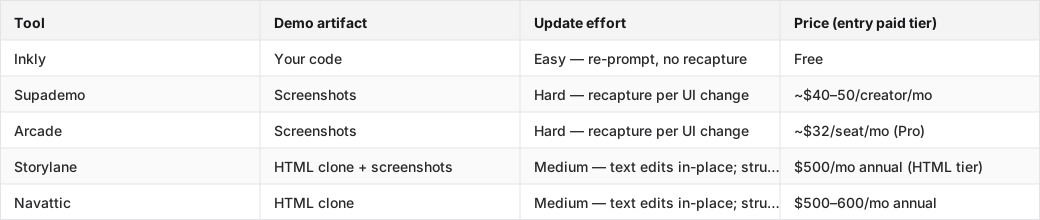
The table below maps the main interactive demo formats against update effort and entry price.
Each row shows the artifact the tool produces, how hard it is to update after a UI change, and what the entry paid tier costs annually.
Tools compared: Inkly, Supademo, Arcade, Storylane, Navattic.
Screenshot tours: fastest to make, hardest to keep current
Supademo and Arcade are the fastest tools for demo #1. The Chrome extension captures screens in minutes, and the editor is clean. The cost appears the first time a UI change hits a screen the demo shows. That screen needs a fresh capture, re-annotation, and re-test. On a weekly shipping cadence, that is a recurring loop. On a monthly cadence, it is manageable.
Video demos: good for async sharing, bad for product drift
A recorded video is the simplest format to share. Drop a Loom link, done. The problem is that video is a fixed artifact. When the UI changes, the video shows the old product. Re-recording is the only fix, and it costs the same time as the original recording. Video works well for evergreen explainers or one-time async reviews. It breaks down when the product ships often.
HTML clones and live sandboxes sit between the extremes
HTML clone tools like Storylane and Navattic handle text and data edits in-place, which helps for copy changes and pricing updates. Structural UI changes, like a new nav, redesigned onboarding, or a new modal, still require a re-clone pass. Sandboxes feel live but can be heavier to provision and maintain per viewer. Both formats sit between screenshot recapture and code-owned demos on the update-effort scale. The catch is price: HTML capability on both tools starts at $500–600/mo annually, which is built for funded GTM teams, not solo PMs or founders.
Pick the demo setup that matches your release cadence and ownership model
Demo software for product managers at a weekly shipping pace is a different decision than the same choice at a monthly pace.
Weekly shipping changes the answer fast
Weekly releases make screenshot-heavy workflows expensive. Every sprint that touches the UI is a recapture session. If the PM owns that work solo, it becomes a standing agenda item. The only formats that survive a weekly cadence without compounding maintenance cost are HTML clones with light structural changes, or code-owned demos that update from a prompt. The PostHog take on product engineers vs product managers is relevant here. When a product engineer is in the loop, the code-owned path becomes viable and the maintenance burden drops significantly.
Biweekly teams can tolerate a little more manual work
Two-week cycles give PMs enough runway to absorb a recapture pass without it becoming a process tax. Screenshot tools are viable if the UI changes per cycle are small. The line is roughly this: one or two affected screens per sprint is a nuisance; five or more is a recurring cost that adds up across a quarter.
Monthly releases leave room for polish
Slower cadence justifies prettier walkthroughs and more polished embeds. When the demo only needs to update once a month, the recapture cost is low enough that screenshot tools are competitive. This is where Arcade's embed polish and Supademo's clean editor are genuine strengths. The maintenance cost is predictable and bounded.
What product managers should ask before they choose a tool
Five questions that cut through the trial experience and surface the real cost.
Can I update this without engineering?
This is the first gate. If every edit requires a developer, the demo becomes a bottleneck the moment the product changes. Screenshot and HTML clone tools are PM-operable. Code-owned tools require either a product engineer or a coding agent (Cursor, Claude, Codex). Know which you have before you commit.
What happens when the product UI changes?
Ask the vendor directly: is the update path recapture, inline edit, or re-prompt? Recapture means re-doing affected screens from scratch. Inline edit means changing content inside the existing clone. Re-prompt means telling an agent what changed and letting it update the code. Each path has a different time cost, and that cost multiplies across every release.
Will analytics, CRM, and security block the rollout?
A tool that passes the freshness test but fails your security review is still a dead end. Check SSO, CRM integration, and data residency requirements before you run a full evaluation. Most of these capabilities sit at mid or upper paid tiers. Verify which tier you actually need, not which tier the trial gives you.
Which demo software category fits each PM scenario
Founder-builder: lightweight first, maintainable second
A founder or indie hacker usually wants the least moving parts. Supademo or Arcade get a shareable demo out the door fast, which matters for the first investor call or early customer conversation. The honest caveat is that if the product ships regularly, the recapture loop starts within a sprint or two. A code-owned setup like Inkly takes slightly longer for the first demo if you are not already using a coding agent, but every subsequent update costs a prompt instead of a session in the editor.
Product engineer: code-native or technically flexible
If the demo can live near the repo and be re-authored by the same agent that maintains the product, the maintenance burden drops in a way no SaaS-locked tool can match. Inkly's bring-your-own-agent path (Cursor, Claude, Codex) is the current MVP. A hosted in-app agent is on the roadmap but not shipped yet. For a product engineer already running an AI coding workflow, this is the natural fit. The tradeoff is that the setup requires an existing agent workflow. It is not a one-click trial.
Demo owner: collaboration and reuse matter more
A PMM or solutions engineer running demos across multiple accounts cares about handoff, versioning, and reuse as much as freshness. Storylane and Navattic are built for this use case. Team seats, CRM integration, and per-account branching are native. The price reflects it: HTML capability starts at $500/mo on both. If the team has budget and the demo workflow is collaborative and sales-led, that price buys a lot of infrastructure. If the PM is operating solo or on a lean budget, it is the wrong tier.
Where Inkly comes in
The structural problem this article keeps naming is that the demo and the product live in different places. When the product changes, the PM has to go fix the demo manually: recapture, re-clone, or re-record. That work is not a tool failure. It is what happens when the demo is an artifact locked inside someone else's SaaS.
Inkly is built on the opposite premise: the demo is code you own, off-platform, living next to the product. When the UI changes, you re-prompt. The coding agent (Cursor, Claude, Codex) updates the demo code the same way it updates the product. No recapture pass, no re-record session. The Chrome-extension capture path gives you the same quick first demo as Supademo. The difference is that it is code from day one, so the next update costs a prompt instead of a re-record.
The honest tradeoff: Inkly requires a coding agent and a repo workflow. If you are not already using Cursor or Claude Code, the bring-your-own-agent path is extra setup. But if you are, demos as code you own is the format that survives your next release without touching the editor.
FAQ
Q: Which demo software helps product managers create, share, and update product demos fastest without depending on engineering?
Screenshot tools like Supademo and Arcade are fastest for the first demo, with no engineering required. For ongoing updates, HTML clone tools (Storylane, Navattic) handle text and data edits in-place without engineering. Code-owned tools like Inkly drop update cost to a prompt but require a coding agent setup (Cursor, Claude, Codex).
Q: How do interactive demos compare with video demos, sandboxes, and cloned environments for product releases that change often?
Interactive screenshot demos are fast to make but require recapture on every UI change. Video demos are simple to share but fixed artifacts. Re-recording is the only update path. HTML clones handle content edits in-place and only need re-cloning on structural changes. Sandboxes feel live but are heavier to provision. Code-owned demos update from a prompt and have the lowest ongoing maintenance cost when releases are frequent.
Q: What should a PM look for if the main problem is stale demos after every feature update?
Focus on the update path first: recapture, inline edit, or re-prompt. Then check who owns the update, PM solo, designer, or engineer with an agent. Finally, match that to your release cadence. A tool that requires recapture on a weekly shipping schedule will turn into a standing maintenance task within a month.
Q: Which demo tools fit a founder or indie hacker who needs a lightweight workflow with minimal maintenance?
Supademo and Arcade are the fastest to start, with a shareable demo in under an hour and no setup. The caveat is recapture cost when the product changes. Inkly is the lower-maintenance option if you already use a coding agent. The first demo takes a bit more setup, but every subsequent update costs a prompt. Pick Supademo or Arcade if you need something today and ship infrequently; consider Inkly if you ship weekly and have an agent workflow.
Q: What options work best for a product engineer who wants a code-native or technically flexible demo setup?
Inkly is the direct fit. The demo is code you own, maintained by the same agent (Cursor, Claude, Codex) that maintains the product. Updates are re-prompts, not re-records. The current MVP is bring-your-own-agent; a hosted in-app agent is roadmap. For a product engineer already running an AI coding workflow, this is the natural extension of how they already work.
Conclusion
Run the freshness scorecard on your own product this week: what is your release cadence, who owns the demo updates, and what does the update path actually cost on the tool you are evaluating? The answer to those three questions will narrow the field faster than any trial. The demo that matters is not the one you ship today. It is the one that still matches the product after your next release.
This is the kind of experience the Inkly demo agent creates end to end.
Ship your next demo before the meeting starts
Interactive demos built from your real product and kept current as you ship, done for you.


