Demo software for sales teams who hate re-recording
A maintenance-first guide to demo software for sales teams. Compare update burden, ownership, CRM fit, and pricing to find the tool that stays current.

Which demo software for sales teams actually stays current when the product ships every week? The answer is not the tool with the longest feature list. It is the one that creates the least work every time the UI changes.
Most buyers judge demo software on capture speed and integration depth. Both matter. Neither tells you what happens the Tuesday after a release, when the nav has changed, the pricing page has been reworked, and the demo still shows last week's product. That is the cost most comparison guides skip.
This article looks at update burden, ownership, and versioning. Those three things decide the ranking.
What demo software for sales teams should optimize for first
Fast capture wins the trial. It does not win the quarter. If your product ships weekly, the demo you built in twenty minutes turns into maintenance before the sprint is over. The real cost is not the first build. It is the work of keeping the thing accurate across every release.
Why capture speed stops being the main question
HBR's research on B2B buyers shows that technical evaluators scrutinize product claims carefully. An outdated UI in a demo is a credibility problem, not just a cosmetic one. The first demo is easy. The one a sprint later, after a nav rename and a pricing page restructure, is where the tool actually gets tested.
The artifact you are really buying
Demo tools split into three categories based on what they produce:
- Screenshot captures — a sequence of static images with click hotspots. Fast to make, but every changed screen needs a fresh capture.
- HTML clones — a scraped copy of the live UI, editable in-place. Text and data swaps happen without recapturing; structural layout changes still require a re-clone.
- Code-owned demos — the demo is code in your repo, authored and maintained by an agent. Updates happen through a prompt, not a recapture.
The artifact shape determines the maintenance cost. Pick the wrong one for your shipping cadence and every release turns into a demo cleanup session.
The four demo formats sales teams actually use
Sales demo software has settled into four formats, and they age very differently.
Screenshot tours and why they age fastest
Screenshot-based tools — Supademo, Arcade on its self-serve tiers — are the fastest way to make a shareable demo. The catch is simple: every screen that changes needs a fresh capture. On a stable product that ships quarterly, that is fine. On a product shipping weekly, every release creates a list of screens to recapture, re-annotate, and re-test. The work grows with the number of affected screens.
HTML clones, sandboxes, overlays, and demo intelligence
HTML clones (Storylane, Navattic) scrape the live UI and let you edit text, data, and tooltips in-place without recapturing. Structural changes, like new modals or layout shifts, still require a re-clone, but day-to-day content updates are faster.
Sandboxes give the buyer a live, isolated environment to explore. The fidelity is high, and so is the maintenance. The environment has to stay provisioned and current.
Overlays layer tooltips and flows on top of the real product. There is no capture step at all. The tradeoff is that the real app has to be live and accessible.
Demo intelligence — analytics, branching, CRM routing — is not a format. It is a layer on top of any of the above. PostHog's sales strategy notes that understanding what prospects actually engage with is one of the highest-leverage signals in early sales. Demo intelligence tools surface that data; they do not solve the maintenance problem.
Which sales demo software is easiest to keep current when the UI changes weekly
The right interactive demo tool for a fast-shipping team is the one where "update the demo" costs the least work per release.
Why weekly shipping punishes re-record workflows
On a screenshot tool, every UI change triggers a recapture pass. Push a nav change and a pricing restructure in the same release, and you are recapturing every screen those changes touch, then re-annotating, re-checking flows, and re-publishing. Do that every week and the demo backlog becomes a standing item on the sprint board.
Update paths compared: recapture, inline edit, or re-prompt
Recapture: screenshot tools make you pay the full cost every time a visual element changes. There is no shortcut.
Inline edit: HTML-clone tools let you update text, labels, and data in place. Structural changes still require a re-clone of the affected section. Faster than recapture for content-only changes, but not free when the layout changes.
Re-prompt: code-owned demos let the agent rewrite the demo. A UI change becomes a prompt, like "update the nav to match the new structure," and the agent regenerates the affected screens. No recapture, no manual annotation. The update cost stays roughly constant no matter how many screens changed.
For teams shipping weekly, re-prompt is the only path that does not pile up.
Where code export, APIs, and embedding matter for technical teams
When your demo has to live next to the product
For builders already working in a repo with a coding agent, a demo locked inside a vendor's SaaS is a liability. Every update means going back to the vendor's editor, re-recording or re-cloning, and re-publishing. That workflow sits outside the normal product development loop.
Code-exportable demos change the ownership model. The demo lives in the repo, versioned alongside the product. When the product changes, the demo changes in the same PR cycle.
What a repo-native refresh actually looks like
The update flow on a code-native demo is plain enough: the product ships a UI change, a developer or agent reads the diff, one prompt regenerates the affected demo screens, and the updated demo ships with the release. The demo and the product stay in sync because they live in the same place.
Compare that with a SaaS-locked capture: the product ships, someone notices the demo is wrong, they open the vendor's editor, they recapture or re-clone, they re-annotate, they re-publish. Two different loops. Two different maintenance burdens.
CRM integrations, pricing, and plan tradeoffs by sales team type
Salesforce and HubSpot are not the whole story
CRM integrations matter for sales teams running a structured pipeline. But a clean Salesforce integration on a screenshot tool only gives you better data on a demo that is going stale faster. Integration value sits on top of a solved maintenance problem. It does not replace one.
PostHog's lead scoring handbook is a good example of what demo automation looks like downstream: scoring based on engagement signals, routing based on intent. That only works if the demo the prospect viewed was actually accurate.
Who pays for the feature set you actually need
Pricing varies sharply by what tier unlocks the capability this article ranks on:
- Supademo: screenshot capture starts on a free tier; the self-serve paid tier runs around $38–50/creator/month. No HTML tier.
- Arcade: screenshot capture on Pro (~$32/seat/month annual). HTML capture is Enterprise-only — sales call required.
- Storylane: Starter at $40/seat/month is screenshot-only. HTML clone unlocks at Growth (~$500/month annual, trial request required).
- Navattic: HTML capture starts at Base (~$500–600/month annual).
- Inkly: free.
For solo founders and small teams, the HTML-tier pricing at Storylane and Navattic puts the feature that reduces maintenance cost behind a $500/month gate. That is the budget reality for anyone not running a funded GTM motion.
Best demo software for sales teams: the ranked shortlist
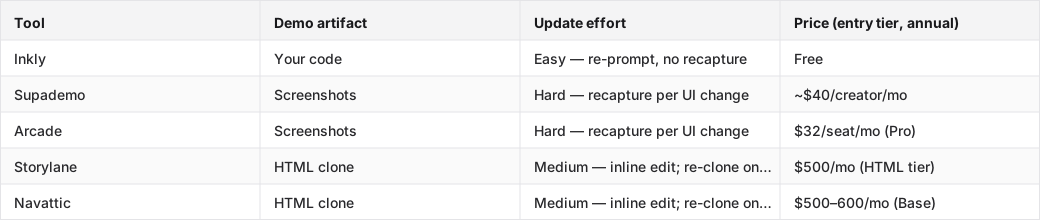
This table shows where each tool lands on the two axes that decide this ranking: update effort and entry price for the capability credited.
Tools compared: Inkly, Supademo, Arcade, Storylane, Navattic.
1. Inkly
Inkly is the right pick for founders and product engineers already using a coding agent and wanting a demo that stays current without a separate maintenance workflow. The demo is code you own. Chrome-extension capture gives you the same fast first demo as Supademo, but the output is code your agent can re-prompt on every later update. No recapture. No re-record. No SaaS editor to go back to. The tradeoff is straightforward: you need Cursor, Claude, or Codex already in your workflow. The hosted in-app agent is still roadmap, not shipped. If you are not already prompting your way through product work, Supademo's all-in-platform flow is the cleaner place to start.
2. Supademo
Supademo is the most mature option for teams that need a demo today and are not running a repo workflow. The capture flow is the cleanest in the category: Chrome extension, screens, share. The AI layer is real too, with inline edits, MCP for natural-language changes, and voiceovers. It wins on first demo, no question. The maintenance cost shows up when the product changes. Every affected screen is its own recapture pass. For products with stable UIs or infrequent releases, that is manageable. For weekly shippers, it compounds.
3. Storylane
Storylane is the right pick for funded sales teams that need HTML fidelity and CRM integration depth: Salesforce, SSO, presenter seats, Deal Intelligence. The HTML clone model means text and data edits happen in-place without recapturing, which is a real maintenance improvement over screenshot tools. The catch is the price. HTML capture starts at Growth (~$500/month annual, trial request), and the full feature set makes it pretty clear who it is built for. Solo founders and small teams will hit the price wall before they hit the feature ceiling. Arcade sits in a similar position, with a cleaner embed story for marketing-led PLG, but HTML is Enterprise-only.
Where Inkly comes in
The problem this article keeps circling is structural: most demo tools produce an artifact that lives in the vendor's SaaS, which means every product change sends you back to the vendor's editor to fix it. That is not really a workflow problem. It is an ownership problem. The demo and the product live in two different places, and they are maintained by two different loops.
The tool that solves this produces a demo that is code you own, off-platform, and maintained by the same agent that maintains your product. That is what Inkly builds. Same Chrome-extension capture path as Supademo for the first demo. Same speed. Same polish. The difference is that the output is code in your repo. When the product ships a UI change, you re-prompt to refresh the demo — no recapture, no editor, no separate maintenance session. For any team already running Cursor, Claude, or Codex, that is the workflow that keeps the demo honest without adding a standing item to the sprint board.
FAQ
Q: Which demo software is easiest to keep updated when the product UI and messaging change often?
Code-owned demo tools handle this with the least work. A UI change becomes an agent prompt, not a recapture session. Inkly is the only tool in this category that produces code you own from capture, which means updates happen in your repo through re-prompting. HTML-clone tools like Storylane and Navattic are the next best option. Text and data edits happen in-place without recapturing, though structural layout changes still require a re-clone.
Q: What demo format should a sales team choose if they want faster setup, fewer live-demo dependencies, and better async sharing?
Screenshot-based interactive demos like Supademo and Arcade are the fastest to set up and share async. No live environment required. No provisioning. The tradeoff is maintenance: every UI change means recapturing affected screens. For teams where faster setup is a day-one priority and the product ships infrequently, screenshot tools are the right call. For teams shipping weekly, that setup advantage disappears after the first release cycle.
Q: Which tools fit a code-native workflow with embedding, APIs, or code export, and which ones create maintenance debt?
Inkly is the only tool that produces demo code you own and can maintain through a coding agent. Every other tool in this comparison keeps the demo inside the vendor's SaaS. Supademo, Arcade, Storylane, and Navattic all require going back to their editor to update. HTML-clone tools, Storylane and Navattic, reduce recapture frequency but do not eliminate the vendor-lock maintenance loop. Code export and repo-native workflows are Inkly's specific wedge.
Q: How do interactive demos, sandboxes, live overlays, and demo intelligence solve different sales problems?
Interactive demos, whether screenshot or HTML, handle async sharing and self-serve discovery. No live environment. No scheduling. Sandboxes give high-intent buyers a real explorable environment, which works well late in the cycle but requires provisioning. Live overlays work for guided walkthroughs on the real product. High fidelity, but the app has to be accessible. Demo intelligence — analytics, CRM routing, branching — is a layer on top of any format that surfaces engagement signals and routes prospects. It does not replace the underlying format choice.
Q: What should a presales leader prioritize if the goal is to shorten cycles and reduce repetitive live demos?
Async-shareable demos with per-account personalization cut the number of repetitive live calls. The format that scales best for this is one where personalizing for a new account costs a prompt rather than a rebuild. That means the demo has to be code or, at minimum, HTML-clone, not a locked screenshot recording. Pair that with demo intelligence to see which flows prospects actually engage with, and route live time to the accounts where it converts.
Conclusion
The weekly-shipping problem does not go away by picking a more polished tool. It goes away by picking a tool where the update cost stays bounded, so a UI change does not automatically queue up a recapture session.
Before you buy, run one test: take the demo you would build with the tool, push a UI change on your product, and measure what the refresh actually costs. On a screenshot tool, count the screens. On an HTML-clone tool, check whether the layout held. On a code-native tool, try the re-prompt. That tells you more about fit for your shipping cadence than any feature comparison will.
Sales teams use Inkly to send a live demo instead of scheduling another call.
Ship your next demo before the meeting starts
Interactive demos built from your real product and kept current as you ship, done for you.


