Demo software for sales engineers is a maintenance trap
A maintenance-first guide to demo software for sales engineers. Compare interactive demos, live demos, sandboxes, and code-native options by update cost, polish

Demo software for sales engineers usually gets sorted into two buckets, even if buyer guides rarely say it out loud: tools that make the first demo fast, and tools that keep the demo right after the product changes. Maintenance is the real divide. This guide compares the main demo types, screenshot capture, HTML clone, live demo, sandbox, and code-native, and gives a verdict by team shape.
What demo software for sales engineers actually has to do
The job is not to produce one polished walkthrough. It's to keep that walkthrough accurate after the next sprint ships, the pricing page gets rearranged, or the onboarding flow changes again. For sales engineers running repeatable demos across a long funnel, a stale demo is not just awkward. It becomes a trust problem. Prospects compare notes. If the demo they watched last Tuesday shows a different UI than the one a colleague saw on Thursday, people start wondering whether the product is stable or just the demo.
The demo has to survive the next release
Sales demo software earns its keep not at launch, but after the third release. A screenshot-based demo looks the same on day one whether the underlying product is stable or shipping weekly. The trouble starts when a nav item gets renamed or a modal gets redesigned. Then every affected screen is wrong, and somebody has to fix it before the next call.
Repeatability beats cleverness when prospects compare notes
Consistency across calls, handoffs, and funnel stages matters more than a clever interaction. Sequoia's note on the Sales-Ready Product makes the point plainly: a demo that converts in the moment has to be the same demo every time, not a one-off performance. If the demo changes from call to call, the story changes too. In a competitive deal, that's a problem.
Why demo maintenance is the cost most tools hide
Before I built Inkly, I was running demos for a previous SaaS project using a screenshot-capture tool. We shipped a redesigned settings flow on a Wednesday. By Friday I had six screens to recapture, re-annotate, and re-sequence before a Monday enterprise call. The product change took the engineering team two hours. The demo update took me most of a day. That gap, a small product change turning into a long demo repair job, is the real cost of demo maintenance. It adds up fast.
Screenshot tools make the first demo easy and the next update annoying
Screenshot-based tools (Supademo, Arcade) are the fastest path to a shareable demo. Capture the screens, add annotations, share the link. If the product ships rarely, the recapture cost stays manageable. If it ships weekly, every UI change sends you back into the editor to recapture the affected screens, re-annotate, and republish. There is no in-place layout edit. The artifact is a locked image, not an editable document.
HTML clones and code-native demos change what an update costs
HTML-clone tools (Storylane, Navattic) capture a live render of the product instead of a screenshot. Text, data, and labels can be edited in place, so changing a heading or a price does not require a full recapture. Structural changes, like a new component or a redesigned nav, still mean re-cloning the affected pages, but the day-to-day update cost is lower. Code-native demos go further: the artifact is code you own, so a change becomes a prompt to your coding agent rather than a manual editor pass.
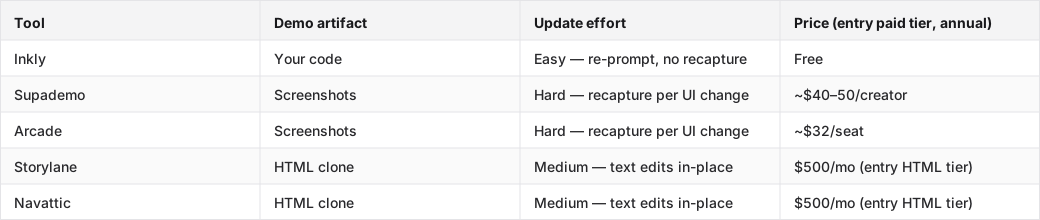
The table below shows where the main tools land on update effort and entry price.
Tools compared: Inkly, Supademo, Arcade, Storylane, Navattic.
Demo software for sales engineers: interactive demos, live demos, and sandboxes compared
The right format depends on what the deal needs. G2's demo automation category lists dozens of tools, but the format question, interactive walkthrough, live demo, or sandbox, matters more than the vendor name. Interactive product demos are the default for most sales engineering use cases, but they're not always the right call.
When an interactive demo wins
Interactive demos make sense when prospects want a polished, self-serve path and the product changes often enough that maintenance matters. A recorded walkthrough with branching and analytics covers most mid-funnel qualification scenarios without needing a live environment or a scheduled call. The maintenance advantage over live demos is simple: the demo is a fixed artifact, not a live system that can break mid-call.
When a live demo still beats the software
High-trust, high-touch enterprise deals, where the prospect wants to ask questions in real time and the answer might change the direction of the demo, still favor live. The tradeoff is rehearsal overhead and environment upkeep. A live demo environment that drifts from the production build becomes a liability, and keeping it aligned with releases is its own maintenance job.
When a sandbox earns its keep
A buyer-facing sandbox, a safe, personalized clone of the product the prospect can actually use, is the strongest signal for technical buyers who need real behavior, not a scripted walkthrough. That realism is the point. The cost is that sandboxes are the heaviest format to keep aligned with product changes. The environment has to track releases, seed data has to stay plausible, and any broken flow is visible to the prospect in real time.
How to keep a demo aligned with product releases
The maintenance loop looks the same no matter what tool you use: a product change lands, the demo is wrong, someone updates it, the new version ships. The question is how much work sits in the middle.
The update workflow from repo change to refreshed demo
On a screenshot tool, the workflow is: identify every affected screen, recapture each one, re-annotate, re-sequence, republish. On an HTML-clone tool, structural changes require re-cloning affected pages; text and data changes can be made directly in the editor. On a code-native tool, the workflow is: describe the change to your coding agent, review the output, push. The effort difference comes from the artifact type, a locked image, an editable document, or code a machine can rewrite.
Version control is the difference between editable and fragile
When multiple people touch a demo, a sales engineer, a product marketer, a founder, a SaaS-locked artifact has no source of truth. The last person to publish wins, and there is no rollback. A demo that lives in a repo has a commit history, branching, and the same review workflow the team already uses for code. Stripe's research on AI coding agents shows that state-of-the-art agents can now handle file-level refactoring reliably, which means a code-owned demo can be maintained through the same agent workflow the team already uses for the product itself.
What matters if your team uses Cursor, Claude Code, or Codex
AI coding agents help only when the demo lives somewhere the agent can edit it. A demo locked inside a vendor's SaaS editor is not accessible to Cursor or Claude Code, so the agent has nothing to work on. Bring-your-own-agent only works when the artifact is code in your repo.
Bring-your-own-agent only works if the repo owns the demo
If the demo is a screenshot sequence inside Supademo's cloud, no amount of Claude prompting updates it. The agent can write code, but it can't reach into a SaaS editor and recapture screens. For agent-maintained demos, the demo has to be a code artifact the agent can read and rewrite, the same way it reads and rewrites any other file in the project.
The maintenance win is re-prompting, not re-recording
On a code-native demo, a UI change becomes: open your agent, describe what changed, review the diff, push. No editor, no recapture, no re-annotation. The agent treats the demo like any other code artifact. On a screenshot tool, the same change means going back to the vendor's UI and manually recapturing every affected screen. The difference is not AI versus no AI, Supademo has real AI features, including an MCP for natural-language edits. The difference is where the artifact lives and whether an agent outside the vendor's platform can edit it.
Demo software for sales engineers by team type
Founder-led sales
Speed and credibility matter most here, and operational overhead has to stay low. A screenshot-capture tool like Supademo or Arcade gets a shareable demo out fast, with a Chrome extension, screens, and a link. The tradeoff is obvious: if the product ships weekly, recapture costs pile up. For a product that is still relatively stable or is being validated, that cost is fine. For a product in active development, a code-native path is cheaper over a quarter even if it takes longer on day one.
Sales engineers on a growing team
Repeatability and handoff matter here. The demo has to stay the same across reps, be updateable without tribal knowledge, and be auditable when something goes wrong. HTML-clone tools reduce per-update work compared with screenshot tools, but the $500/mo entry tier for HTML on Storylane or Navattic is priced for funded GTM teams. The feature list, Salesforce, SSO, Deal Intelligence, tells you who they're building for. For a team that already works in a repo and uses coding agents, a code-native path gives you version control, agent maintainability, and no per-seat pricing at the capability tier that matters.
Product engineers and vibe coders
If you already live in a codebase and prompt your way through most product work, a demo that lives in the same repo is the natural fit. The maintenance workflow matches the product workflow: describe the change, review the output, push. PostHog's founder-sales playbook makes the point that the best early demos come from people who know the product cold. A code-native demo lets that knowledge stay in the artifact instead of sitting only in the presenter's head.
Where Inkly comes in
The structural problem this guide keeps coming back to is simple: most demo tools make the artifact hard to reach with the tools you already use to maintain your product. The demo lives in someone else's cloud, and every update means going back to their editor.
Inkly is built on the opposite premise: the demo is code you own, off-platform, living next to the product. The Chrome-extension capture path matches Supademo on first-demo speed. The difference shows up on every update after that. Instead of recapturing screens, you re-prompt your coding agent and push a diff. The honest limitation is that Inkly requires a coding agent (Cursor, Claude Code, Codex) and a repo workflow. If your team does not work that way yet, Supademo's all-in-platform flow is the cleaner starting point. If you already prompt your way through the product, demos as code you own is the maintenance model that compounds in your favor.
FAQ
Q: What demo software is best for a sales engineer who needs polished, repeatable demos with minimal upkeep?
The maintenance-first answer is a code-native tool like Inkly, where updates cost a prompt instead of a recapture pass. The tradeoff is a repo-based workflow and a bring-your-own-agent requirement. If that's not your setup yet, an HTML-clone tool like Storylane or Navattic reduces update work compared with screenshot tools, but the entry HTML tier runs $500/mo on both, which is really priced for funded GTM teams.
Q: Which demo approach is easiest to maintain as the product changes: screen recording, interactive walkthrough, live demo, or sandbox?
Ranked by maintenance cost, low to high: code-native interactive demo, HTML-clone interactive demo, screen recording, live demo, sandbox. Screen recordings require recapture on every UI change. Live demos require a maintained environment. Sandboxes require the most ongoing alignment work. Code-native demos reduce updates to a prompt, while HTML clones handle text edits in place but still need re-cloning when the structure changes.
Q: How do you keep a demo environment aligned with product releases without rebuilding everything?
The levers are artifact type and version control. An editable artifact, HTML clone or code, means most updates are in-place edits instead of full rebuilds. Version control, a repo, commit history, branching, means changes are tracked, reversible, and reviewable. Code-owned artifacts plus agent-maintained updates are the cleanest maintenance setup: describe the change, review the diff, push.
Q: What should a founder-led sales team choose if it needs speed, credibility, and low operational overhead?
For a product in early validation or shipping infrequently, Supademo or Arcade gets a credible demo out fast with minimal setup. For a product in active development with a founder who already uses a coding agent, Inkly matches the first-demo speed and removes the recapture cost on later releases. The decision turns on how often the product ships, not how polished the first demo needs to look.
Q: How much engineering time is required to create and update an interactive demo or sandbox?
Screenshot-based demos require no engineering involvement for creation, but they scale linearly with UI changes. Every affected screen is a manual recapture. HTML-clone demos require a technical setup pass but reduce ongoing update work for text and data changes. Code-native demos require a repo workflow and a coding agent, but updates cost agent time rather than human editor time. Sandboxes are the heaviest: the initial setup takes engineering work, and keeping the environment aligned with releases is an ongoing maintenance commitment.
Conclusion
The right demo software for sales engineers is the one that is still accurate after the next release, not the one that looks best on day one. Pick one demo format, ship a release change to the product this week, and see whether you update the demo or rebuild it. That test tells you more than any feature comparison. If the answer is rebuild, the tool is costing you more than its price tag suggests.
If you are an SE tired of rebuilding environments, see how solutions engineers run demos as code.
Ship your next demo before the meeting starts
Interactive demos built from your real product and kept current as you ship, done for you.


