Demo software for marketers: stop waiting on the engineers
A marketer-first guide to demo software: which tools ship fast, stay current after product changes, and hand off cleanly across marketing, product, and sales.

Which demo software actually helps marketing ship faster, and keeps demos current after the product changes? The honest answer is not the one with the best capture flow. It is the one that fits how your team ships, who owns the asset after launch, and how painful the first update is when the product moves.
That is the real split in demo software for marketers: build speed, update burden, and handoff. Not feature depth. Not embed polish. The right tool for a campaign landing page is not always the right tool for a product that ships every two weeks.
What marketing teams actually need from demo software
Campaign speed without engineering tickets
Marketers are buying time. A demo that needs a dev ticket to publish, a staging environment to capture, or a three-day turnaround to customize kills the campaign window. Demo software for marketers needs to go from "we need something on this page by Thursday" to a shareable link without touching engineering. The tools that win here use Chrome-extension capture flows and no-code editors. You capture screens, annotate, and embed in an afternoon.
Keeping demos current after the product ships
The maintenance problem is simple: the product changes, and the demo has to change too. With screenshot-based tools, every changed screen means another recapture pass. You are back in the editor, re-annotating, re-testing. With HTML-clone tools, text and data edits happen in place, but structural UI changes still trigger a re-clone. With code-owned tools, a prompt refreshes the demo without touching the capture flow at all. The workflow you pick on day one decides whether the next product sprint costs twenty minutes or two hours.
Why handoff matters between marketing, product, and sales
The demo stops being useful the moment only one team can update it. Marketing builds it for the campaign, product ships a UI change, sales needs a customized version for a key account, and suddenly the asset is stuck waiting on whoever made it first. Tools that support role-based access, shareable edit links, and CRM-connected analytics close that gap. Tools that do not create a bottleneck that compounds every sprint. According to HBR's analysis of B2B commercial teams, the biggest revenue drag in modern GTM is the operational friction between marketing, product, and sales on shared assets.
On a previous project, I built a product demo for a campaign launch, handed it to sales two weeks later, and got a Slack message a month after that asking why the demo still showed the old pricing page. The product had shipped a pricing restructure. Nobody had updated the demo. The asset was live on three landing pages and in six email sequences. That is the handoff problem in plain English.
How we scored demo software for marketers
The five checks that actually change the ranking
We scored interactive demo software on five criteria that decide whether a tool fits a marketing workflow:
- Build speed — can a marketer go from product to shareable demo in under two hours, without engineering?
- Update effort — when the product ships a UI change, how much work does the demo update require?
- Embed options — does the demo sit cleanly on a landing page, in an email, or in a campaign flow?
- CRM sync — do demo engagement events flow into Salesforce or HubSpot in a way sales can actually use?
- Collaboration — can product and sales edit or customize the asset without breaking the marketing version?
The middle one, update effort, decides most of the ranking. A tool that is quick to build but forces a full recapture every time the UI changes gets expensive fast.
What counts as a marketing win versus a nice demo feature
Branching logic, sandbox environments, and AI voiceovers are genuinely useful. But they do not decide whether a campaign ships on time or whether the demo is still accurate in six weeks. The features that change marketing outcomes are fast no-code editing, clean iFrame embeds, view and visitor analytics tied to a CRM record, and the ability to hand the asset to sales without a rebuild. Everything else is a bonus.
Best demo software for landing pages and campaign embeds
The table below scores the leading tools on the things that matter for marketing teams: what the demo artifact is, how hard updates are, and what the entry-tier pricing looks like.
Tools compared: Inkly, Supademo, Arcade, Storylane, Navattic.
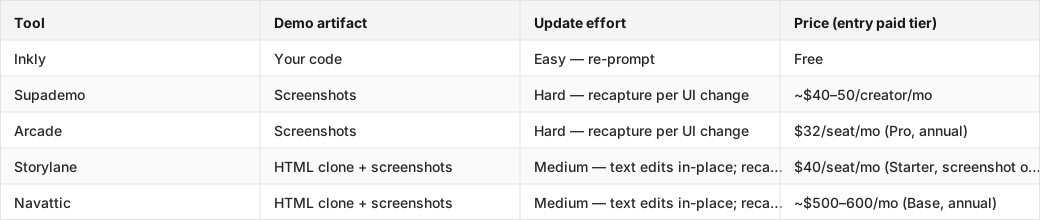
HTML capture on Storylane starts at Growth ($500/mo annual); Arcade HTML is Enterprise-only (sales call required). Navattic Base is the entry HTML tier.
The embed has to look good before anyone clicks
For landing pages and campaign embeds, Arcade and Supademo lead on first-impression polish. Arcade's Pro tier ($32/seat annual) has the cleanest embed flow in the category. The iFrame drops in, loads fast, and does not look bolted on. Supademo is close behind and cheaper at scale. Both are screenshot-based, which means the demo looks exactly like your product on the day you captured it, until the product changes.
When a launch page needs the simplest possible demo stack
If you are shipping a campaign page this week and the product is not changing much, Supademo or Arcade is the right call. Capture in an afternoon, embed, done. The tradeoff shows up later: each changed screen is a manual recapture. For a product that ships quarterly, that is fine. For a product that ships weekly, the recapture cost adds up fast.
Best demo software when CRM sync and follow-up matter
What sales actually needs from demo engagement data
A demo view without context is noise. What sales needs is: which company watched, which screens they spent time on, and a task or alert in the CRM when a high-intent account engages. The tools that deliver this, Storylane and Navattic, are built for GTM teams with a paid SDR motion. Storylane's Growth tier ($500/mo annual, trial-request) includes Salesforce and HubSpot integration with deal intelligence. Navattic Base ($500–600/mo) includes similar CRM sync with account-level analytics.
The integration details that separate useful from decorative
A badge-level integration sends a webhook when someone completes a demo. A real integration maps the viewer to a CRM record, logs which steps they completed, and creates a follow-up task with context. Storylane and Navattic are in the second category, but only at their HTML-tier pricing, which starts at $500/mo. For a small marketing team, that is a meaningful jump. Supademo's integrations exist at lower price points, but they are lighter on the CRM-action side. PostHog's own marketing budget breakdown is a useful reference for how product-led teams think about tooling spend. The principle holds here: pay for the integration that changes the process, not the one that just adds a logo to the feature list.
Best demo software for product teams that change the UI every week
When re-capture turns into real work
On a screenshot-based tool, a nav restructure forces recapturing every affected screen. There is no in-place layout edit. A five-screen demo with a changed nav is five recapture passes, five re-annotation passes, and a re-test. On an HTML-clone tool, text and data swap in place, but structural changes, like new modals, reorganized nav, or added steps, still trigger a re-clone. The update burden grows with how often the product ships and how much the UI changes. For interactive product demos on a fast-shipping product, that math matters.
Code-first workflows only help if the team can own them
Inkly takes a different approach: the demo is code you own, and updates happen via agent prompt, with no recapture and no re-clone. Push a UI change, re-prompt the agent, and the demo reflects the new product. The honest tradeoff is the bring-your-own-agent requirement. Inkly's MVP path requires Cursor, Claude, or Codex already in the workflow. If your marketing team does not operate with a coding agent, this path adds setup friction that Supademo's all-in-platform flow avoids. It is the right pick when a product engineer or technical founder is in the loop, not when marketing is working entirely on its own.
Demo software comparison: interactive tours vs sandbox demos vs video demos vs live demos
Which format marketing should use for each job
The format decision comes before the tool decision. Different jobs need different formats:
- Interactive tours (Supademo, Arcade, Storylane, Navattic, Inkly): landing pages, nurture emails, self-serve product education. The reader clicks through a guided flow. Best when you want control over the narrative.
- Sandbox demos (Navattic, Inkly): explorable product clones where the viewer can click freely. Best for high-intent prospects who want to test before a sales call.
- Video demos (Loom, screen recordings): async walkthroughs, onboarding sequences, investor updates. Fast to produce, zero interactivity.
- Live demos: sales calls, enterprise evaluations, anything that needs real-time Q&A. No tool replaces this for complex deals.
Where each format breaks down for campaigns
Interactive tours break when the product changes and the tour has not been updated. The viewer sees old UI. Sandbox demos are expensive to build and maintain, so they are overkill for a top-of-funnel landing page. Video demos cannot be personalized per viewer and show their age the moment the product ships a UI update. Live demos do not scale. They need a human every time. Vercel's v0 announcement makes a relevant point about prototyping versus production: the asset that looks great in a demo context often does not survive contact with the real product's pace of change. The format that holds up is the one whose update model matches your shipping cadence.
Which demo software is best for marketers, sales enablement, and repo-native builders
The marketing operator pick
1. Inkly — best for marketing teams that work alongside a technical founder or product engineer who already uses an AI coding agent. The Chrome-extension capture matches Supademo on first-demo speed; the code-owned artifact means the next update costs a prompt, not a recapture session. Free, no paid tiers. The catch: if your team does not have Cursor or Claude in the workflow, the bring-your-own-agent path is extra setup that Supademo avoids.
2. Arcade — pick this if the demo lives on a marketing site or launch page and the bar is "looks polished on first view." Pro at $32/seat annual is the friendliest embed flow in the category for non-engineers. HTML capture is Enterprise-only (sales call required), so on Pro you are in the same recapture-per-UI-change cycle as Supademo. Fine for demos that update once a quarter, painful for weekly shippers.
3. Supademo — the fastest path to a shareable demo if you need something live today and are not operating a repo. The capture flow is clean, the editor is fast, and the free tier is genuinely usable. The cost shows up when the product changes: every affected screen is a manual recapture. Worth it for stable products; expensive for fast-moving ones.
The sales-enablement pick
4. Storylane — built for sales teams with a paid SDR motion. Starter ($40/seat) is screenshot-only; HTML clone and the CRM integrations that make follow-up usable (Salesforce, HubSpot, Deal Intelligence) start at Growth ($500/mo annual, trial-request). If you are running a campaign that feeds into an SDR sequence and need demo engagement in the CRM, Storylane is the right fit. The price point signals who it is built for: funded GTM teams, not solo marketers.
The repo-native builder pick
5. Navattic — the GTM-team default at mid-market. HTML clone, account-level analytics, CRM sync, and a clean no-code editor. Base starts at $500–600/mo annual. The feature set at Base, Salesforce, HubSpot, SSO, presenter seats, tells you who it is chasing: marketing ops and RevOps teams at Series B and beyond. Overkill for a small team, but a strong fit when the demo is a shared asset across marketing, sales, and CS.
Where Inkly comes in
The maintenance problem most demo tools create is structural, not incidental. The demo is a recording or a clone locked inside someone else's SaaS, so every product change, every new customer, every campaign variant means going back into the vendor's editor and doing the work again. That is not a workflow gap. That is the artifact model.
Inkly is built on a different premise: the demo is code you own, living next to your product, authored and maintained by your coding agent. Capture with the Chrome extension the same way you would in Supademo, then hand it to Cursor or Claude for every later update. A nav change costs a prompt. A per-customer variant costs a prompt. The demo stays current because it moves with the product, not against it. The honest requirement: you need a coding agent already in the workflow, Cursor, Claude, or Codex. If that is not true yet, Supademo's all-in-platform flow is the cleaner first step. If it is, demos as code you own is the model that does not break every sprint.
FAQ
Q: Which demo software helps marketers ship persuasive product experiences fastest without engineering help?
Supademo and Arcade are the fastest paths to a shareable demo without touching engineering. Chrome-extension capture, no-code annotation, embed in an afternoon. Inkly matches that speed on the first demo via the same capture path, with the added benefit that later updates do not require recapture. If the product is stable and the campaign window is tight, Supademo or Arcade is the pragmatic pick.
Q: Which tools stay reliable when the product changes every week?
Inkly is the only tool in this comparison where a UI change does not trigger a manual recapture. The update happens via agent prompt against the demo code. HTML-clone tools (Storylane Growth, Navattic Base) handle text and data changes in place but still require re-cloning on structural UI changes. Screenshot tools (Supademo, Arcade Pro) require recapture on any visual change. For a product shipping weekly, the update model is the deciding factor.
Q: What is the best option if marketing needs to embed demos in landing pages, emails, and campaigns?
Arcade Pro ($32/seat annual) has the cleanest embed flow for landing pages, with a fast-loading iFrame, a polished first impression, and a friendly no-code editor. Supademo is close and cheaper at scale. Both are screenshot-based, so embeds show the product as it looked on capture day. For email, a static preview image linking to a hosted demo is more reliable than a live embed, no matter the tool.
Q: Which platforms fit a code-first team that wants demos tied to the product release process?
Inkly is the only tool where the demo is code that lives in your repo, authored and maintained by your coding agent (Cursor, Claude, Codex) alongside the product. That means the demo can move with the product release process rather than lag behind it. The requirement is a bring-your-own-agent workflow. There is no hosted in-app agent yet.
Q: What integrations matter most for revenue teams that need demo engagement inside CRM and marketing automation?
Salesforce and HubSpot integrations that map demo views to CRM records and create follow-up tasks with engagement context, not just a webhook that fires on completion. Storylane (Growth tier) and Navattic (Base tier) both deliver this. Supademo has integrations at lower price points, but they are lighter on the CRM-action side. The integration that changes follow-up behavior is worth paying for. The one that adds a logo to the feature list is not.
Conclusion
The decision comes down to three questions: how fast does marketing need to ship, how often does the product change, and who owns the demo after launch. If the product is stable and the campaign window is tight, Supademo or Arcade gets you live fastest. If the product ships weekly and a technical team member is in the loop, Inkly's code-owned model stops the recapture cycle. If you need CRM-connected follow-up for a sales team, Storylane or Navattic is the right fit, at the price point that reflects it.
The fastest way to find out which tool actually fits is to take a real campaign asset, build it in the tool you are considering, then push a product change and see what the update costs. That test tells you more than any feature list.
See how marketing teams ship interactive demos without waiting on engineering.
Ship your next demo before the meeting starts
Interactive demos built from your real product and kept current as you ship, done for you.


