Demo software to close deals faster
Compare demo software by the job it actually does: close deals faster with personalized demos, CRM sync, analytics, and the right workflow for your sales stage.

Which demo software actually helps you close deals faster when every prospect wants a version that feels built for them? It's not the tool with the prettiest editor. The right demo software to close deals faster is the one that fits your sales motion, your stage, your product's volatility, and how complicated the buyer really is. Here's a way to make that choice less vague.
Choose the demo motion that fits your sales stage
Most demo software comparisons rank tools by capture quality. That's not the point. The question that matters is simple: which motion fits the way your deal actually moves?
The four motions buyers actually compare
Live demo — a rep walks the prospect through the product in real time. It takes more effort, but it works when the buyer wants to ask questions as they go or the product is too complex for a recorded walkthrough.
Async video — a recorded walkthrough the buyer watches on their own time. Easy to send, easy to forward. It falls apart fast when the product changes.
Interactive demo — a clickable, guided tour the buyer can explore at their own pace. No scheduling required. Useful across accounts without eating up rep time. This is the format you see a lot in PLG and mid-funnel nurture.
Sandbox — a live, explorable environment with real or synthetic data. It takes more setup, but it can pay off when the buyer needs hands-on proof before procurement signs off.
When the buyer needs speed, not theater
Early-stage deals and high-volume outbound do not need a live call. They need something the rep can send in under five minutes, and something the prospect can pass to a colleague without friction. An interactive demo or a short async video usually wins here. The rep moves faster, the buyer evaluates on their schedule, and the deal does not sit around waiting for a calendar slot.
PostHog's startup sales strategy says this plainly: early sales are about removing friction from the buyer's evaluation, not showing off every feature.
When the deal is complex enough to justify a sandbox
Multiple stakeholders, a security review, or a technical buyer who wants to run their own queries changes the job entirely. A sandbox earns its keep when the alternative is three more live calls. Storylane and Navattic both support HTML-cloned environments for this pattern; the tradeoff is that those tiers start at $500+/month and the setup is manual.
Use personalization where it shortens the next step
Personalization matters for per-account selling, but only if the workflow stays light enough that reps actually use it.
Per-account demos need a different workflow
If swapping a logo and a company name in a UI editor takes ten minutes per account, that sounds small until you multiply it by a twenty-account pipeline. Suddenly personalization is a part-time job. The workflow has to be fast enough that the rep does it without thinking. Otherwise it does not happen, and the buyer gets the generic version.
What changes when the buyer sees their own company in the demo
The practical changes are usually small: their logo on the dashboard, their industry's data in the charts, their use case named in the callouts. That's enough. A buyer who sees their own world in the demo is more likely to forward it to their boss. A buyer who sees a generic SaaS demo usually files it under "maybe later."
Vercel's v0 launch post describes GTM teams using live previews, mock data, and branded experiences built in minutes. It's the same personalization loop, just applied to demos.
The tradeoff every personalized demo hides
If every account-specific change means re-recording or rebuilding inside a SaaS editor, personalization turns into a tax. One way around that is to use agents to swap branding, copy, and sandbox data from the same base demo code. One re-prompt gives you a new variant without touching the original. That is what makes personalization scale.
Make CRM sync and analytics do real work
CRM sync and engagement data do not shorten cycles by themselves. They help when the rep can see who watched, who forwarded, and which stakeholder went cold, and when the system surfaces that without manual logging.
Why engagement data matters more than opens
An email open tells you almost nothing. A demo view that lasted four minutes, got forwarded to a VP, and stopped at the pricing screen tells you the deal is alive and where the objection lives. Sales demo software that shows that level of detail helps the rep follow up on the right moment, not just the right day.
How CRM sync helps the handoff stay clean
The useful part of CRM integration is not the logo on the settings page. It's the demo activity, view time, and share events attached to the deal record automatically. When marketing hands off a warm account to sales, the rep can see which demo the prospect already watched. That changes the next call.
When analytics are just dashboard noise
A tool that reports "5 views" without telling the rep who viewed, when, or how far they got is not much of an analytics feature. It's just a number. A common failure mode is buying the tool for its integrations dashboard and then finding out the data never changes rep behavior. Before buying on analytics, ask a boring but useful question: does this create a specific next action for the rep, or just a number to screenshot?
Pick the tool that matches your team shape
The right interactive demo software for a three-person founding team is not the right tool for a twenty-rep sales org. The motion has to fit who owns the demo and how it moves between people.
Founder-led sales wants less ceremony
A founder-seller needs to send a tailored demo fast, keep the workflow simple, and avoid building a process that needs a dedicated person to maintain it. The lowest-friction answer is usually an interactive demo or async video the founder can update themselves. No re-record. No ticket to engineering. No waiting on a designer.
A sales team needs handoffs, not just pretty links
When sales, marketing, and product all touch the demo, the real requirement is a clean handoff. Marketing creates the base demo. Sales personalizes it per account. Product updates it when the UI changes. Tools that lock the demo inside a SaaS editor with per-seat pricing make that handoff expensive. Tools with shared libraries, template branching, or code export make it cheaper.
Repo-first teams want the demo to live near the product
Builder-heavy teams, like product engineers, technical founders, and AI-native startups, usually care about owning the artifact. When the demo is code in the repo, an agent can update it the same way it updates the product: one prompt, one diff, one review. No re-record. No manual click-through in someone else's UI. The demo stays current because it lives where the changes happen.
Rank the demo software by what actually shortens time to close
Use this lens: sales stage fit, personalization depth, CRM and analytics usefulness, and the cost of keeping the demo current. Those four things decide whether a tool shortens your cycle or just adds a prettier artifact to it.
Why first-send speed and long-cycle conversion are not the same
Tools built for first-send speed, like fast capture, clean output, and a shareable link in under an hour, are genuinely useful at the top of the funnel. They get expensive when the product ships a UI change and every demo in the pipeline now shows the old version. Long-cycle conversion needs a demo that stays honest across multiple touches and multiple stakeholders.
The shortlist logic by motion, not by brand
Tools compared: Supademo, Arcade, Storylane, Navattic, Inkly.
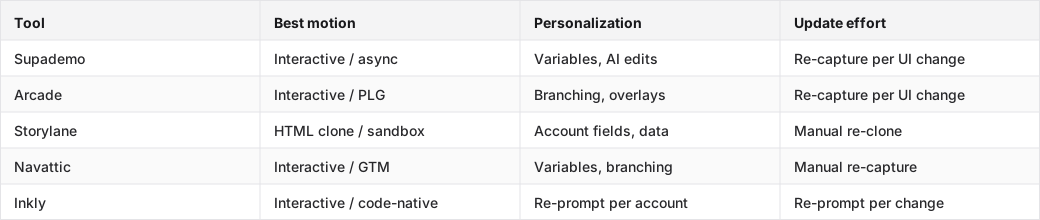
Supademo and Arcade are strong on first-send speed and polish. You can get a shareable interactive demo out fast, with no heavy setup. The tradeoff shows up later, when the product changes or the next account needs a tailored version: you have to re-capture the affected screens. Storylane and Navattic are useful for GTM teams with HTML environments and deal rooms, but their entry HTML tiers start at $500/month and up. Inkly is free, includes HTML demos, and uses a prompt instead of a re-record for updates. The catch is obvious: you need a coding agent like Cursor, Claude, or Codex already in your workflow.
Where Inkly comes in
The problem with most demo tools is that personalization and updates end up being the same annoying task: go back to the editor, re-capture the affected screens, re-export. If you send ten tailored demos a week, that is not a small thing. That is work.
Inkly takes a different route. The demo is code you own, not a recording trapped inside a SaaS tool. When a prospect asks for their logo and their industry's data in the demo, you re-prompt your agent against the base demo code. Same flow, fresh branding, minutes later. When the product ships a UI change, the same re-prompt refreshes every affected screen without sending you back through a capture tool. The three-prompt loop, create, update, produce variants, replaces the three things that usually break demo workflows: re-recording for updates, re-recording for new customers, and demos that go stale between the first send and the close.
HTML capture is available on Inkly's free tier. There is only one tier. If you already run Cursor or Claude Code and you want to ship personalized demos without rebuilding them per account, that's the workflow Inkly is built for.
FAQ
Q: Which demo software helps a sales team close deals faster without requiring a lot of manual customization?
Interactive demo tools with variable substitution or agent-based personalization, like Supademo, Navattic, or Inkly, let reps swap branding and data without rebuilding everything from scratch. The tradeoff is where the work happens: in the UI editor per account with Supademo or Navattic, or with a single re-prompt off base code in Inkly. If you send a high volume of tailored demos, the re-prompt workflow scales better.
Q: What should a founder-seller choose if they need to send demos quickly and keep the workflow lightweight?
An interactive demo tool with fast capture and simple sharing, like Supademo or Arcade for the first demo, or Inkly if you already use a coding agent and want updates to cost a prompt instead of a re-record. Do not overbuild it. A clean five-screen interactive flow usually beats a sandbox the founder has to maintain manually.
Q: How do you choose between a live demo tool, an async video tool, an interactive demo, and a sandbox?
Map the tool to sales stage and buyer complexity. Early-funnel and high-volume deals usually work better with an interactive demo or async video. Mid-funnel deals with multiple stakeholders need interactive sharing and engagement tracking. Late-stage technical evaluation or procurement is where a sandbox helps most. Use a live demo when the buyer needs real-time Q&A and the deal size justifies the rep's time.
Q: Which demo software keeps product demos current when the product changes often?
Code-native workflows handle frequent changes best. The demo updates when the product does, through a re-prompt rather than a re-capture. Screenshot-based tools like Supademo and Arcade require re-capturing every affected screen after a UI change. HTML-clone tools like Storylane and Navattic need a manual re-clone. The catch with code-native tools is simple: you need an agent already in your workflow.
Q: What features actually matter for shortening sales cycles: personalization, analytics, CRM sync, or buyer hubs?
Personalization matters early because it gets the demo forwarded to the next stakeholder. Engagement analytics matter mid-cycle because they show who is active and where the deal stalled. CRM sync matters for handoffs because it keeps deal context in one place. Buyer hubs matter late, when multiple stakeholders need asynchronous access without another call. Buying a tool for all four and using one of them is probably the most common waste.
Conclusion
Match the demo motion to the sales stage first. Personalization, CRM sync, and analytics help, but they do not rescue a demo that is wrong for the buyer's stage or the rep's workflow. Pick one real prospect in your current pipeline, send them your current demo, and watch what happens next. If it does not shorten the path to a reply, a meeting, or a close, the motion is wrong. Fix that before you evaluate another tool.
Ship your next demo before the meeting starts
Interactive demos built from your real product and kept current as you ship, done for you.


